Running LLMs on Kubernetes in Production: KServe, vLLM, llm-d, Envoy AI Gateway, and LiteLLM
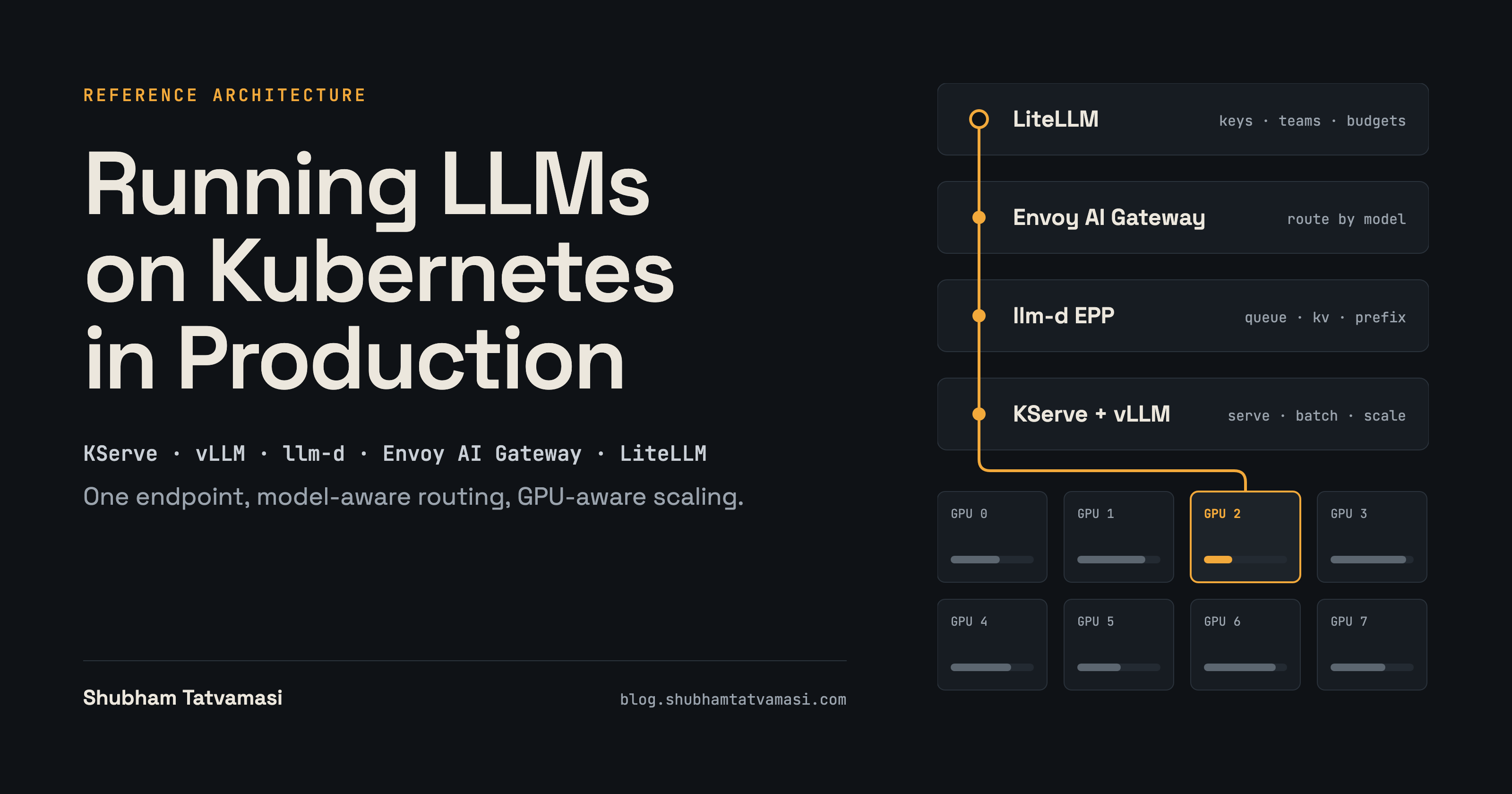
One OpenAI-compatible endpoint, model-aware routing, GPU-aware scheduling, and scaling driven by inference pressure—not CPU alone.
Self-hosting an LLM on Kubernetes is easy to demonstrate. Operating a fleet of models under real traffic is a different problem.
A production inference platform must answer several questions at once: Who may call each model? How do we prevent one team from consuming the entire budget? Which replica should receive the next request? Does that replica have room in its KV cache? Can we add capacity without downloading model weights from scratch? What happens when every GPU is full—or when a node disappears halfway through a rollout?
This article lays out a reference architecture that separates those concerns across LiteLLM, Envoy Gateway with Envoy AI Gateway, KServe LLMInferenceService, llm-d, vLLM, the NVIDIA GPU Operator, Prometheus, and KEDA.
Scope and accuracy note: This is a production-oriented reference architecture and technical design, not a claim that every component shown has been deployed together in one production environment or that benchmark results have been measured. Kubernetes AI-serving APIs evolve quickly; the examples below follow the current KServe 0.20 documentation and current upstream component guides available on 10 October 2026. Pin compatible releases and validate the exact fields against your chosen versions before deploying.
What “production” means for inference
A model returning a successful response is only the starting point. For this design, production means five things:
Governed access: individual or service-specific virtual keys, model allow-lists, budgets, rate limits, revocation, and a clear tenant boundary.
Inference-aware routing: choose a model by its public name, then choose a suitable replica using queue and cache state rather than relying only on round-robin balancing.
Capacity that follows demand: scale model replicas when inference pressure rises, then add GPU nodes when the new replicas cannot be scheduled.
Useful observability: connect request latency and token usage to model replicas, KV cache, GPU utilization, and—where configured—team or key usage.
Safe operations: control model downloads, GPU placement, readiness, disruption, rollouts, and cold-start behaviour.
The main design principle is separation of responsibilities. No single component should be responsible for identity, model lifecycle, GPU scheduling, inference routing, and billing at the same time.
The architecture: one public endpoint, two gateway layers
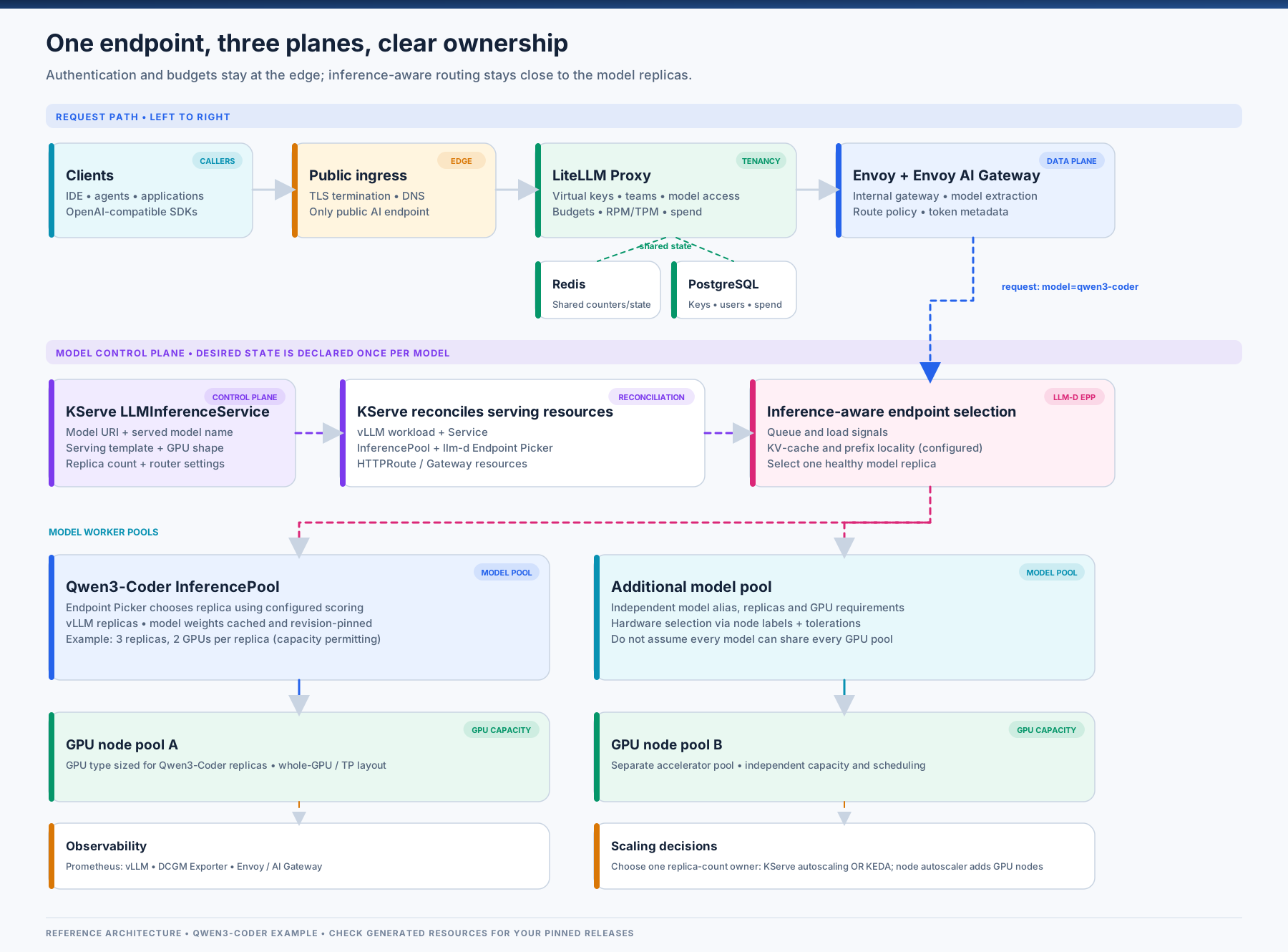
The request path has two gateway layers, but that does not mean two independent Envoy proxy hops. LiteLLM is the public API and tenancy layer. Envoy Gateway provides the proxy data plane, while Envoy AI Gateway adds LLM-aware request processing and usage metering. The llm-d Endpoint Picker (EPP) is consulted by the gateway to select a model-server endpoint in an InferencePool.
| Component | Responsibility | What it should not own |
|---|---|---|
| LiteLLM Proxy | Public OpenAI-compatible endpoint, virtual keys, teams, budgets, per-key model access, rate limits, request routing to the internal gateway, and configured spend tracking | GPU-pod selection or GPU-node lifecycle |
| Envoy Gateway + Envoy AI Gateway | HTTP/TLS gateway, model-name extraction from OpenAI-compatible request bodies, route matching, token-usage metadata, and gateway-level security or rate-limiting policies | Model weights, GPU scheduling, or tenant budget truth stored in LiteLLM |
KServe LLMInferenceService |
Kubernetes-native model-serving API and lifecycle management; configures the serving workload and router resources | User-facing identity and cost governance |
| llm-d InferencePool + EPP | Groups replicas and chooses a suitable endpoint using configured inference-aware scheduling signals such as queue depth, KV-cache use, and prefix-cache locality | User/team key management |
| vLLM | Model execution, batching, token generation, and serving metrics | Public tenant identity and budgets |
| NVIDIA GPU Operator | NVIDIA driver/toolkit/device-plugin lifecycle and GPU telemetry components, depending on installation configuration | General scheduling policy for all vendor hardware |
| Prometheus + KEDA + node autoscaler | Collect metrics, scale workloads using inference-specific signals, and provision additional GPU nodes where the infrastructure integration supports it | Choosing which model or tenant is authorized to run |
| Redis + PostgreSQL | Shared proxy state and durable key/team/user/spend data for a multi-replica LiteLLM deployment | The model-serving data path itself |
KServe’s current LLMInferenceService overview describes the resource as a GenAI-oriented serving API built around llm-d’s serving architecture. llm-d’s Endpoint Picker documentation explains how the proxy asks the EPP for a backend and how the picker uses endpoint state and configurable scoring.
Keep the internal gateway internal
Clients should call one public URL, for example https://llm.example.com/v1. Expose LiteLLM through a TLS-terminating ingress or load balancer, but keep the inference gateway on a private address or ClusterIP unless there is a clear reason to expose it.
Use defence in depth:
Store the gateway credential in a Kubernetes Secret and pass it to LiteLLM as an environment-backed setting.
Apply an Envoy Gateway
SecurityPolicyor an equivalent supported policy to require that credential on the internal gateway.Use a
NetworkPolicyor equivalent network control so only the LiteLLM workload can reach the internal gateway.Keep the LiteLLM admin UI and management endpoints behind SSO and appropriate network access rules.
The gateway credential is a service-to-service credential; it is not a replacement for LiteLLM’s user and team virtual keys. Keep the two boundaries separate.
GPU infrastructure: build a fleet, not one undifferentiated pool
The scheduling problem begins before a request reaches vLLM. A cluster with a mix of GPU models should express that hardware inventory explicitly. An 8B model and a 70B model may have very different memory, bandwidth, and parallelism requirements, so a single generic GPU pool is rarely an ideal operational abstraction.
The NVIDIA GPU Operator automates key NVIDIA Kubernetes components such as the driver, container toolkit, device plugin, GPU feature discovery, and DCGM-based monitoring. The exact set depends on the Operator configuration and version. GPU Feature Discovery can publish node labels such as nvidia.com/gpu.product so workloads can select compatible hardware.
A scheduling fragment for an NVIDIA H100 pool might look like this; use the exact label value from your nodes, not the example string blindly:
nodeSelector:
  nvidia.com/gpu.product: NVIDIA-H100-80GB-HBM3

tolerations:
  - key: nvidia.com/gpu
    operator: Exists
    effect: NoSchedule
I normally prefer to taint dedicated GPU nodes so ordinary CPU workloads do not consume them accidentally. The serving workload then opts in through a toleration and selects its target hardware through node labels. For clusters with both NVIDIA and AMD GPUs, keep vendor-specific provisioning and telemetry paths explicit; the NVIDIA GPU Operator is not an AMD GPU management stack.
GPU sharing is a capacity decision, not just a scheduler switch
For predictable large-model serving, start with a replica assigned a known number of whole GPUs. Tensor parallelism commonly spans multiple GPUs within a node, so the replica’s GPU request and placement constraints must agree with the vLLM configuration.
GPU sharing may improve utilization for small models or development environments, but understand the isolation model:
MIG partitions supported NVIDIA GPUs into hardware instances with dedicated compute and memory resources.
Device-plugin time-slicing makes a GPU appear as multiple schedulable slots, but it does not create separate physical VRAM for each slot. Processes can still compete for memory and compute.
Whole-GPU allocation is easier to reason about for latency-sensitive or memory-heavy models, at the cost of potentially leaving capacity unused.
Do not treat --gpu-memory-utilization 0.9 as a universal safe default. It is a vLLM tuning value, not a Kubernetes memory isolation boundary. Set it based on the model, KV-cache budget, runtime overhead, and whether any other process can share the GPU.
Size the model and KV cache together
Model weights are only part of GPU memory consumption. A useful first estimate is:
GPU memory ≈ model weights + KV cache + runtime/workspace overhead + safety headroom
At a very rough lower bound, BF16 weights require about two bytes per parameter and FP8 weights about one byte per parameter, before scales, metadata, workspaces, and other runtime allocations. A 70B-parameter model in FP8 is therefore on the order of 70 GB for raw weights alone; it still needs room for KV cache and runtime overhead. That is a starting estimate, not a guarantee that a particular model will fit on one or two specific GPUs.
KV-cache demand grows with context length and concurrent sequences. Quantization may make a model fit or enable more replicas, but evaluate quality and serving performance as well as the memory savings. Benchmark with the prompt lengths, output lengths, batching, and concurrency your users actually produce.
Model serving: KServe LLMInferenceService, vLLM, and llm-d
The goal is to describe a model declaratively and let the Kubernetes control plane reconcile its serving resources. With KServe’s LLMInferenceService and the llm-d integration, the resource can configure the workload plus an InferencePool and routing components, including an Endpoint Picker.
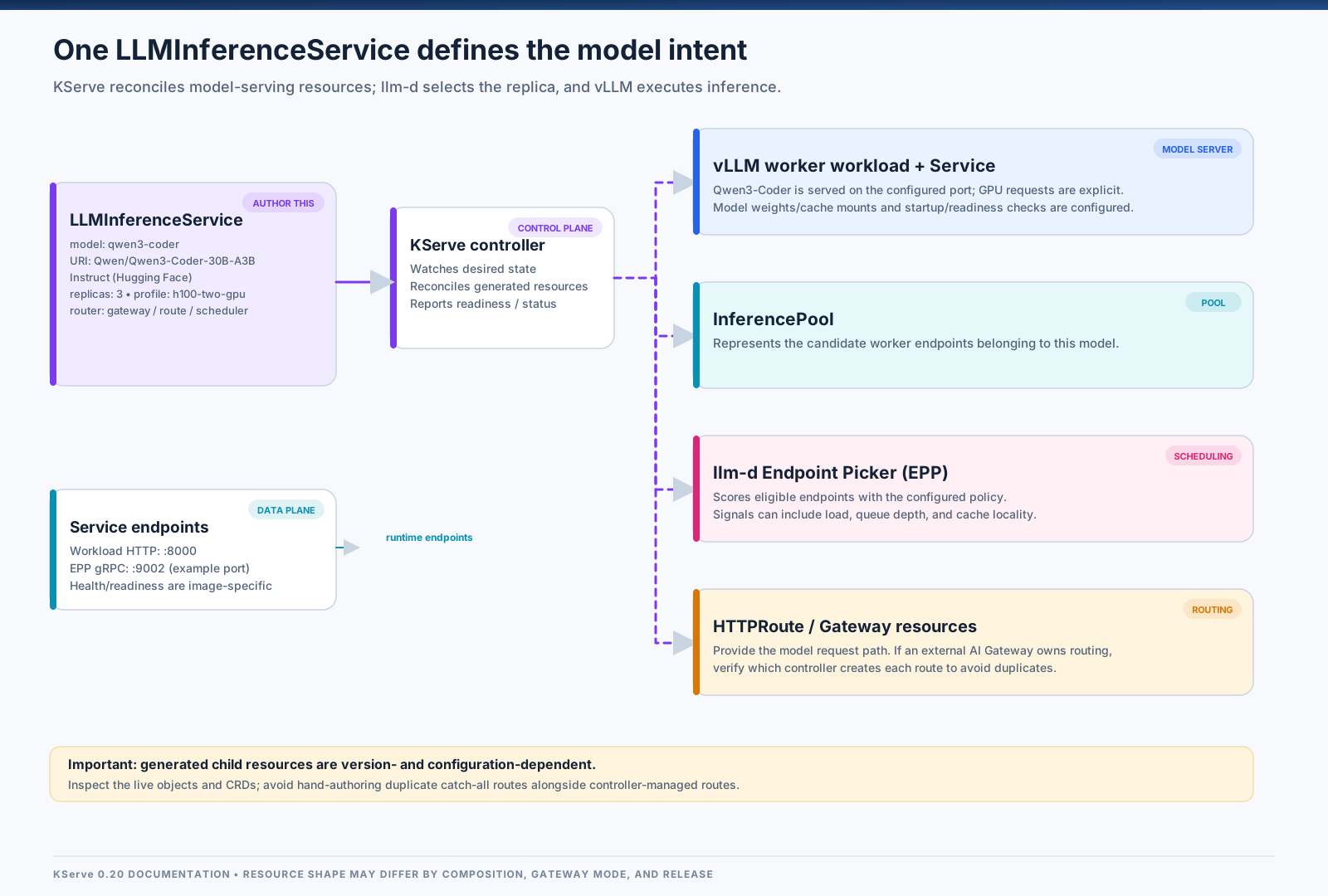
The following shows the split between a platform-owned accelerator profile and a model-specific service. This follows KServe’s configuration-composition pattern: reusable LLMInferenceServiceConfig resources can supply accelerator-specific defaults, while each LLMInferenceService declares the model and replica count. These examples use serving.kserve.io/v1alpha1, as illustrated in the KServe 0.20 configuration guide; confirm the served API version and fields in your own CRDs before deploying.
First, define a workload profile for one replica using two H100 GPUs. Leave the default serving image, model-storage wiring, probes, and security context to the KServe configuration installed with your selected release unless you have a reason to override them. This profile only changes the accelerator placement and resource budget:
apiVersion: serving.kserve.io/v1alpha1
kind: LLMInferenceServiceConfig
metadata:
  name: h100-two-gpu
  namespace: kserve
spec:
  parallelism:
    tensor: 2
  template:
    nodeSelector:
      nvidia.com/gpu.product: NVIDIA-H100-80GB-HBM3
    tolerations:
      - key: nvidia.com/gpu
        operator: Exists
        effect: NoSchedule
    containers:
      - name: main
        resources:
          requests:
            cpu: "16"
            memory: 128Gi
            nvidia.com/gpu: "2"
          limits:
            cpu: "16"
            memory: 128Gi
            nvidia.com/gpu: "2"
Then declare the model and how many replicas to run:
apiVersion: serving.kserve.io/v1alpha1
kind: LLMInferenceService
metadata:
  name: qwen3-coder
  namespace: models
spec:
  baseRefs:
    - name: h100-two-gpu
  model:
    name: qwen3-coder
    uri: hf://Qwen/Qwen3-Coder-30B-A3B-Instruct
  replicas: 3
  router:
    gateway: {}
    route: {}
    scheduler: {}
This creates three replicas using the two-GPU profile, assuming the profile is visible to the service and the cluster has compatible capacity. The exact profile namespace, node label, and scheduling fields must match your KServe installation. For gated models, supply repository credentials through Secrets; do not bake tokens into the manifest. The controller provides sensible defaults for parts of the serving workload, but inspect the rendered resources and readiness probes before rolling it out broadly.
For this Qwen3-Coder example, enable the model’s dedicated tool-call parser if clients use function/tool calling. The equivalent vLLM runtime flags are:
--max-model-len 32768 \
--enable-auto-tool-choice \
--tool-call-parser qwen3_coder
Pass these through the serving arguments mechanism supported by your pinned vLLM/llm-d image; the exact KServe field or environment variable is image- and release-specific. The 32768 value is an intentional serving cap for this example, not the model’s maximum native context length. Keep the runtime cap, LiteLLM input/output token limits, and KV-cache budget aligned. The Qwen3-Coder vLLM recipe documents the qwen3_coder parser for Qwen3-Coder models.
This is a starting point, not a universal manifest. Before applying it, verify the selected model is compatible with your vLLM version and serving image, the requested GPUs fit on a node with the required topology, and the probes allow for model-loading time. For a multi-node model, configure KServe’s documented worker and parallelism settings rather than assuming a two-GPU single-node example will scale across hosts.
Why llm-d changes the routing conversation
A conventional load balancer mostly knows backend health and connection state. LLM inference benefits from more specific signals. The llm-d EPP can score available model-server endpoints using configurable signals such as queue depth, running requests, KV-cache utilization, and prefix-cache locality. That means the best endpoint is not necessarily the pod with the fewest connections.
Prefix-aware routing can help when many requests share a long system prompt, chat history, or retrieval context. Sending a request to a replica with reusable prefix state may avoid recomputing some prompt tokens and improve time to first token. It is not magic: the result depends on the cache configuration, workload shape, scoring profile, and whether requests really share useful prefixes.
The llm-d EPP documentation describes the request path: Envoy calls the EPP using the External Processing protocol, the picker evaluates endpoints, and the proxy forwards the request to the selected model server. The selected pod is still responsible for actually generating the tokens.
Other choices matter at this layer too:
Tensor parallelism splits model execution across GPUs and is useful when one GPU cannot hold or efficiently serve the model. Keep the GPUs and network topology appropriate for the chosen parallelism.
Prefill/decode disaggregation can make sense for high-throughput or long-prompt workloads, but introduces more moving parts and should follow workload measurements rather than being the default for every model.
Rollouts consume scarce GPU capacity. Ensure the rollout strategy supported by your installed KServe release matches the free GPU headroom you actually have. If the cluster cannot run old and new replicas simultaneously, plan explicitly for temporary reduced capacity or maintain warm headroom.
Do not make model startup a dependency on the public Hub
A pod that needs to download several gigabytes of weights on every restart turns node churn and scale-out into long waits. Pin model revisions and warm weights before they are required.
Options include KServe’s Local Model Cache, node-local NVMe, storage that supports the required access pattern, or a controlled internal object store. For large fleets, model storage is part of capacity engineering: measure download time, cache hit rate, cold-start duration, disk pressure, and the effect of rolling many replicas at once.
One additional image compatibility issue is worth checking when using llm-d CUDA images. The upstream llm-d Dockerfile documents different TRITON_LIBCUDA_PATH values for RHEL and Ubuntu AMD64. Verify this variable against the exact image, OS and architecture you deploy instead of copying a path from a different environment (llm-d CUDA Dockerfile).
Route by model name: Envoy AI Gateway and the InferencePool
Clients should send the public model name in the normal OpenAI-compatible request body. Envoy AI Gateway can extract that model field to x-ai-eg-model, after which the route can match the name and send the request to the correct backend. If the backend is an llm-d InferencePool, the Endpoint Picker selects a suitable replica inside that pool.
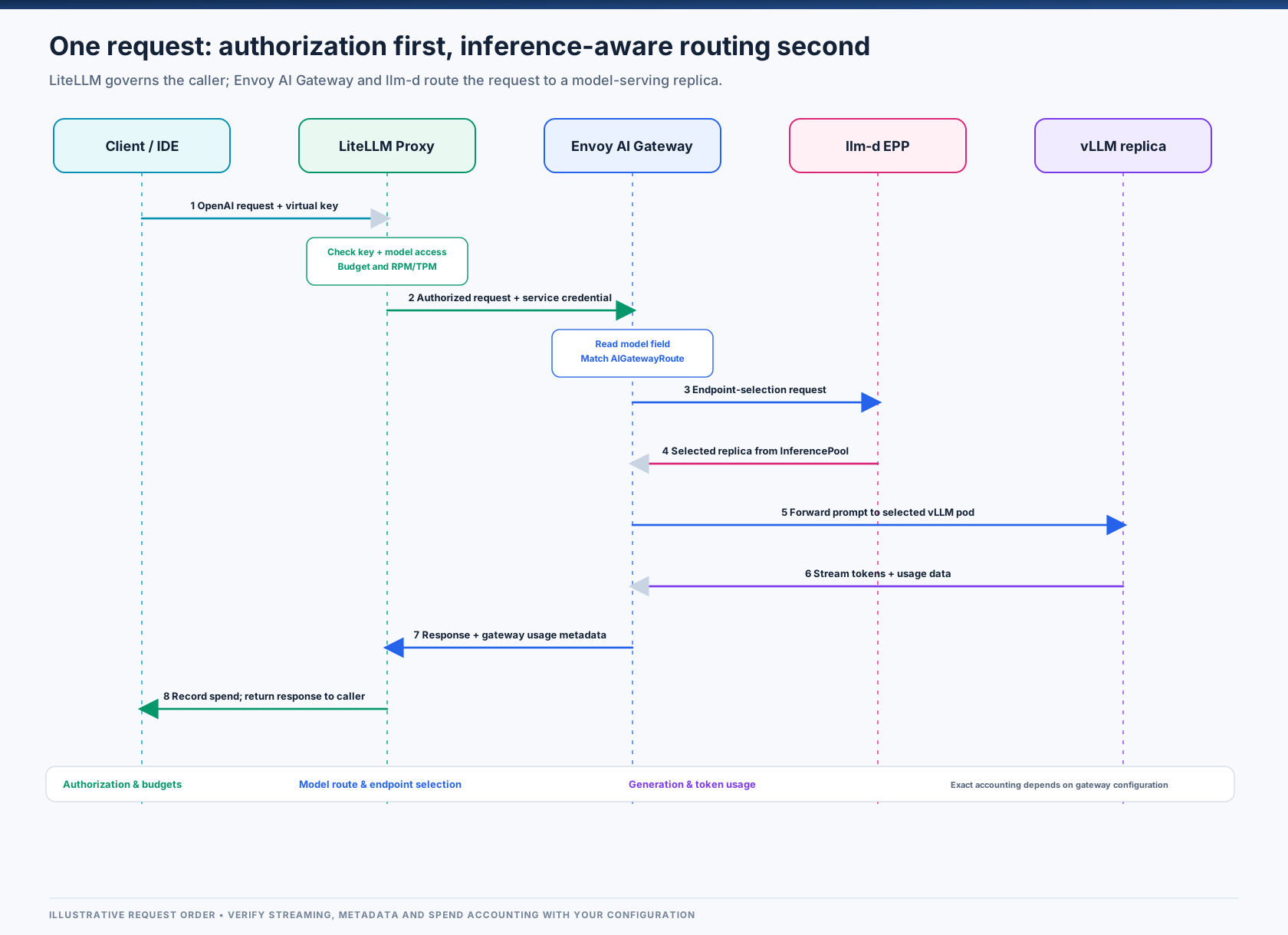
For one model, the route shape is similar to the following. This uses the KServe 0.20 integration’s aigateway.envoyproxy.io/v1alpha1 example and Gateway API Inference Extension backend group inference.networking.x-k8s.io; verify these APIs are installed and compatible in your cluster.
apiVersion: aigateway.envoyproxy.io/v1alpha1
kind: AIGatewayRoute
metadata:
  name: llm-models
  namespace: models
spec:
  parentRefs:
    - name: inference-gateway
      kind: Gateway
      group: gateway.networking.k8s.io
  rules:
    - matches:
        - headers:
            - type: Exact
              name: x-ai-eg-model
              value: qwen3-coder
      backendRefs:
        - group: inference.networking.x-k8s.io
          kind: InferencePool
          name: qwen3-coder-inference-pool
      timeouts:
        request: 300s
  llmRequestCosts:
    - metadataKey: llm_input_token
      type: InputToken
    - metadataKey: llm_output_token
      type: OutputToken
    - metadataKey: llm_total_token
      type: TotalToken
An AIGatewayRoute can contain rules for multiple model names. The llmRequestCosts settings capture input, output, and total token usage into request metadata so that gateway policies can use the values. Token accounting is not itself a pricing policy: decide separately how token counts map to quotas or cost.
The current KServe integration guide for Envoy AI Gateway and LLMInferenceService is the best place to check the complete manifests for the versions you select. Pay special attention to which controller owns the user-facing route. If KServe creates a managed route while you add a separate gateway route, inspect the generated HTTPRoute objects to avoid overlapping catch-all paths or exposing an unintended route.
Request buffering, security, and timeouts
OpenAI-compatible chat bodies can become large with long contexts, tools, images, and retrieval payloads. Set explicit body-buffer and request-timeout policies for the maximum payload you intend to accept, and test the largest realistic request through the entire proxy chain. Defaults vary by component and release, so avoid assuming one historical buffer limit applies to every installation.
For the internal gateway:
restrict network reachability to LiteLLM;
require its service credential at the gateway;
keep the public key/user boundary at LiteLLM;
set request and backend timeouts appropriate for generation, not just ordinary short HTTP calls;
test streaming responses, client cancellation, oversized prompts, upstream timeouts, and unknown model names;
verify that route rules and
InferencePoolreferences reconcile successfully after upgrades.
LiteLLM is the front door for people, teams, and budgets
LiteLLM provides the API clients integrate with. It keeps the public contract stable while the underlying model or GPU pool changes. The same key and access pattern can be used by an IDE, agent, internal app, or evaluation harness, while the platform team retains control over which models are available to each caller.
A shortened configuration excerpt looks like this:
model_list:
  - model_name: qwen3-coder
    litellm_params:
      model: openai/qwen3-coder
      api_base: http://inference-gateway.envoy-gateway-system.svc.cluster.local/v1
      api_key: os.environ/GATEWAY_API_KEY
    model_info:
      max_input_tokens: 28672
      max_output_tokens: 4096

general_settings:
  master_key: os.environ/LITELLM_MASTER_KEY
  database_url: os.environ/DATABASE_URL

router_settings:
  redis_host: os.environ/REDIS_HOST
  redis_port: 6379
  redis_password: os.environ/REDIS_PASSWORD
The service names and model aliases above are placeholders. The qwen3-coder alias must match the name clients send and the route match in the AI Gateway. Store all credentials in Secrets, not in a committed ConfigMap or repository. Model context limits must agree across vLLM, LiteLLM’s model_info, and client settings. In the example, 28,672 input tokens plus 4,096 reserved output tokens equals a 32,768-token total budget; reduce those values if the model or KV-cache budget requires it.
For a multi-replica proxy, Redis provides shared state for rate limiting and routing, while PostgreSQL stores the data needed for virtual keys, users, teams, configuration, and spend tracking. See LiteLLM’s current production deployment guide and virtual keys documentation for the supported deployment mode and configuration details.
A critical operational detail: do not assume budgets are enforced if the database is absent or unavailable in a configuration that cannot verify spend. LiteLLM documents that its virtual-key and budget features depend on the database. Choose the failure policy deliberately, and test what happens when Redis or PostgreSQL is unavailable. If a budget is a hard financial limit, configure and test the supported fail-closed behaviour for your pinned LiteLLM release.
Why use both LiteLLM and Envoy AI Gateway?
They overlap at first glance because both can participate in routing. Their useful boundary is different:
LiteLLM: who is calling, which public model alias they may use, how much they may consume, and how usage is attributed to keys or teams.
Envoy AI Gateway: gateway-level request parsing and routing to the appropriate inference pool, along with token metadata and gateway policies.
llm-d EPP: which replica in the chosen pool is best suited for this request under the configured scheduling profile.
This architecture adds components, so it is not the minimum stack for a single model or a low-traffic experiment. If you only need one model and a shared API key, start simpler. Add this layering when multi-tenancy, quotas, multiple models, inference-aware routing, and operational separation justify the complexity.
Autoscaling: scale replicas from inference pressure, then scale the GPU fleet
CPU and memory remain useful signals for node health and general resource pressure, but they do not directly describe an LLM server’s backlog. A replica can have low CPU and still be saturated by GPU work or constrained by its KV cache. For this reason, use inference-specific metrics alongside ordinary Kubernetes signals.
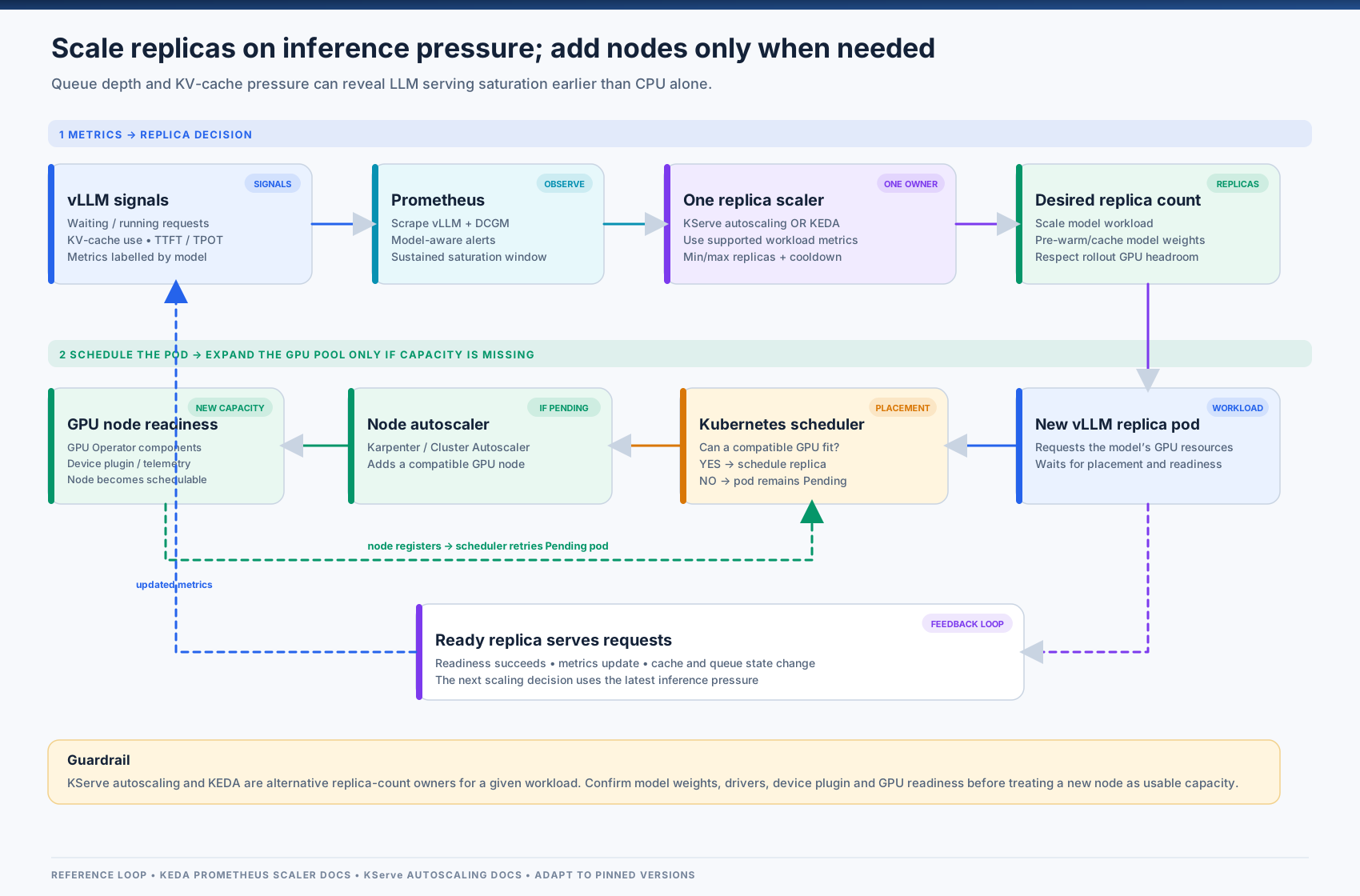
KServe 0.20 documents workload-variant autoscaling through spec.scaling, with HPA or KEDA as actuator options. For example, the relevant part of a service can look like this:
spec:
  scaling:
    minReplicas: 2
    maxReplicas: 8
    wva:
      variantCost: "10.0"
      keda: {}
This is an autoscaling alternative to a fixed spec.replicas value, not a block to add alongside it. The exact WVA metrics and prerequisites are version-dependent; follow the KServe autoscaling configuration guide and confirm the selected metrics and actuator are configured in your deployment.
For a custom KEDA Prometheus scaler on a Deployment that you manage directly, use a metric such as vllm:num_requests_waiting only after confirming the metric labels and target semantics in your vLLM build. KEDA’s Prometheus scaler documentation specifies that the query must return a single vector/scalar value. Do not attach an independent autoscaler to a Deployment whose replica count is already owned by KServe’s WVA; two controllers fighting over replicas creates unpredictable results.
Replica scaling and node scaling are related but separate loops:
Queue depth or another inference-specific signal says the existing model replicas are not keeping up.
The model-serving scaler requests more replicas up to the configured maximum.
Kubernetes schedules the new pods onto compatible free GPUs.
If no suitable GPU capacity exists, the pods remain Pending.
A node autoscaler or infrastructure provisioning system adds nodes if it supports that environment and node pool.
The GPU node becomes usable only after the driver, container toolkit, device plugin, model cache, and serving readiness requirements are met.
In a cloud cluster, node groups or a supported node-autoscaling integration may provision capacity automatically. In an on-premises cluster, GPU nodes may require a separate capacity-management workflow; do not assume a cloud node autoscaler can provision physical servers for you.
Three factors dominate the scale-out delay:
Model load time: cache weights locally and measure cold-start duration. Downloading model weights on every scale-out can turn a minutes-long operation into a reliability problem.
Node readiness: a new GPU node is not useful until the hardware is discovered and all required drivers and device plugins are healthy.
Scale-in safety: allow a cooldown long enough to avoid immediately removing a freshly loaded replica during a short traffic dip; use disruption and rollout policies that preserve the capacity your latency SLO requires.
Scale-to-zero can save money for rarely used models, but the first request after idle may wait for node provisioning, model download, and initialization. Use it only for workloads whose user experience tolerates the cold start.
Observability: tie token latency to the GPU serving the model
A useful dashboard should connect four layers rather than putting one GPU chart next to one HTTP chart and hoping an operator can infer the relationship.
| Layer | What to collect | What it tells you |
|---|---|---|
| vLLM | waiting/running requests, KV-cache usage, prefix-cache hits and queries, time to first token (TTFT), inter-token latency, prompt and generated tokens | Is the model-server queue growing? Is the cache under pressure? Are users waiting before the first token or between tokens? |
| GPU telemetry | GPU utilization, framebuffer memory, temperature, power, hardware/XID errors | Is the GPU active, memory-constrained, thermally constrained, or reporting hardware errors? |
| Envoy / AI Gateway | request count, route/backend latency, upstream errors, input/output/total token metadata | Which model route fails or slows, and how much token traffic passes through the gateway? |
| LiteLLM | key, user, team, model and configured spend/usage data | Which tenants are consuming capacity or approaching quotas? |
| Kubernetes | Pending pods, restarts, readiness, node conditions, GPU allocatable resources | Is scale-out blocked by model loading, scheduling, missing drivers, or capacity? |
The vLLM production metrics reference currently documents metrics including vllm:num_requests_waiting, vllm:num_requests_running, vllm:kv_cache_usage_perc, vllm:prefix_cache_hits, vllm:prefix_cache_queries, and vllm:time_to_first_token_seconds. In that API, vllm:kv_cache_usage_perc is a fraction: 1 means 100% usage. Confirm names and label sets against the pinned vLLM version before writing alerts.
Example queries for a deployment where the model_name label is present:
# Total waiting requests grouped by model
sum by (model_name) (vllm:num_requests_waiting)

# Peak KV-cache utilization per model (1.0 == 100%)
max by (model_name) (vllm:kv_cache_usage_perc)

# p95 time to first token by model
histogram_quantile(
  0.95,
  sum by (le, model_name) (rate(vllm:time_to_first_token_seconds_bucket[5m]))
)
The model_name label and any pod/instance labels depend on your vLLM and scraping configuration. Treat these as patterns to adapt, not a promise that every exporter exposes identical labels.
For NVIDIA GPUs, DCGM Exporter exposes selected telemetry as Prometheus metrics. The DCGM Exporter documentation explains how it can run as a Kubernetes DaemonSet or under GPU Operator management. If you need per-workload attribution, verify that your exporter is configured to attach Kubernetes pod metadata and that the labels can be joined safely with your workload metrics; raw device metrics alone may not tell you which pod owns the activity.
Start alerting on a few actionable conditions:
waiting requests remain above the scale-out target longer than the measured time required to add useful capacity;
p95 TTFT breaches the model’s SLO;
KV-cache usage stays near saturation and queue depth increases;
a GPU reports hardware errors, or GPU memory pressure rises unexpectedly;
model routes return no matching backend or return repeated upstream errors;
new replicas stay Pending because no compatible GPU is available;
model-loading or readiness time grows after an image, model, or driver update.
Use rate or increase functions for counters and sensible time windows; avoid alerts based only on cumulative totals that never go down. Also avoid treating high GPU utilization as the one universal success metric. A healthy system must meet latency and quality targets at an acceptable cost per useful token, not simply keep every GPU busy.
Production readiness checklist
Before sending real users through the platform, verify the whole request path, including failure behaviour.
[ ] One public HTTPS endpoint; internal inference gateway is network-restricted and credential-protected.
[ ] LiteLLM has PostgreSQL and shared Redis configured for the features and replica count you rely on.
[ ] Virtual keys, model allow-lists, budgets, rate limits, revocation, and database/Redis outage behaviour are tested.
[ ]
LLMInferenceService, InferencePool, EPP, and HTTPRoute resources reconcile correctly for each model.[ ] Exactly one controller owns the desired replica count for a workload.
[ ] GPU node pools are labelled and tainted intentionally; resource requests match the model’s GPU topology.
[ ] Memory planning accounts for weights, KV cache, context length, concurrency, and runtime overhead.
[ ] Model weights are pinned and cached; cold starts and storage failures are measured.
[ ] Readiness, startup behaviour, termination, disruption, and rollout strategy have been tested against the target GPU headroom.
[ ] Gateway request buffers, request timeouts, streaming behaviour, oversized requests, and cancellation have been tested.
[ ] Dashboards connect vLLM, Envoy, LiteLLM, DCGM, and Kubernetes signals.
[ ] Autoscaling uses inference-appropriate metrics and does not conflict with KServe’s scaling controller.
[ ] Alerts cover queue depth, p95 TTFT, KV-cache saturation, GPU errors, failed routes, Pending replicas, and model startup.
[ ] Model, driver, CUDA, GPU Operator, KServe, llm-d, Envoy Gateway, Envoy AI Gateway, LiteLLM, and KEDA versions are pinned and upgrade-tested together.
What I would deploy first
I would not begin by installing every component at once. A safer path is to prove the runtime and then add governance and optimizations one layer at a time:
One model, one GPU pool: serve Qwen3-Coder on a suitable GPU pool, make model storage and GPU discovery reliable, and collect basic metrics.
KServe lifecycle: create the model through
LLMInferenceService, confirm the generated resources, probes, logs, and upgrade behaviour.llm-d routing: add an InferencePool and EPP; test routing with multiple replicas and repeated shared-prefix prompts.
Envoy AI Gateway: add model-aware routing, token metadata, gateway controls, and timeouts while keeping the route internal.
LiteLLM governance: add keys, teams, quotas, budgets, PostgreSQL and Redis, and verify hard-limit and outage behaviour.
Inference-aware scaling: enable KServe’s supported autoscaling path, then verify that node provisioning and model caching can catch up with replica demand.
Failure drills: remove a node, block the model store, saturate KV cache, submit an unknown model, revoke a key, and take Redis or the database offline in a test environment.
This sequence gives each layer a known baseline before introducing the next failure domain. It also creates measurable milestones: first-token latency, steady-state tokens/second, queueing under concurrency, cold-start time, scale-out time, error rate, GPU memory headroom, and cost per successful request.
Closing thought
Reliable LLM inference on Kubernetes is not just a GPU scheduling problem or a model-server problem. It is the coordination of identity, routing, runtime state, model storage, hardware capacity, and feedback loops.
The architecture described here keeps those responsibilities separate: LiteLLM governs access and usage, Envoy AI Gateway understands AI requests and routes them into an inference pool, llm-d chooses the serving replica, KServe manages the model-serving resources, and vLLM generates tokens on GPU capacity that is observable and scalable.
The most important production habit is to measure each layer independently—and then connect the measurements. Queue depth explains pressure, TTFT and inter-token latency explain user experience, KV-cache metrics explain a key runtime constraint, GPU telemetry explains hardware activity, and tenant-level usage explains who is consuming the platform. Put those together, and inference becomes an operable platform rather than a collection of GPU pods.
Further reading
Upstream documentation and compatibility checks
The reference design is assembled from upstream project documentation. Because the KServe generative-inference and Gateway API ecosystems evolve quickly, pin releases as a tested set and review the versioned documentation before applying examples:
These references describe component capabilities, not a promise that any single set of manifests is portable across arbitrary releases. Validate CRDs and versions in a disposable cluster with kubectl apply --server-side --dry-run=server and inspect the reconciled child resources before a production rollout.
