KAI Scheduler Deep Dive: How NVIDIA Schedules GPUs on Kubernetes
Why GPU clusters need a different scheduler
The default kube-scheduler places one pod at a time, on one node, using a filter-and-score loop. That model is excellent for stateless microservices and wrong for most AI work. A 16-GPU PyTorch job is useless until all 16 workers run. A team that paid for 8 H100s expects to get them back when another team borrows them. And a notebook that needs a quarter of a GPU should not lock a whole one.
KAI Scheduler is NVIDIA's open-source answer to those problems. It is a Kubernetes-native batch scheduler, built on the ideas of kube-batch, that adds hierarchical queues with quotas, gang scheduling, fair share, reclaim and preemption, fractional GPUs, topology-aware placement and DRA. It runs as a second scheduler beside kube-scheduler, so you opt workloads in with schedulerName: kai-scheduler.
This post walks through how it actually works: every component, the path a pod takes from kubectl apply to a running container, the scheduling cycle and its five actions, the fair-share maths, how fractional GPUs are faked on a device plugin that only knows whole GPUs, and how topology shapes placement. Then a hands-on install and a comparison with Volcano and Kueue.
Version baseline (checked 21 October 2026): KAI Scheduler v0.18.x (v0.18.0 released 23 September 2026, latest patch v0.18.6). The project is a CNCF Sandbox project, Apache 2.0 licensed. Several features covered here (semi-preemptible workloads,
queuePriorityInQuotaReclaim, NvFractions) are alpha or new in 0.18, so pin versions and read the migration guides before upgrading.
The short answer
Use KAI when several teams share a GPU pool and you need guaranteed quotas, borrowing of idle GPUs, and the ability to take those GPUs back automatically.
Use KAI when distributed training or multi-pod inference must start all-or-nothing, especially across racks or NVLink domains.
Use KAI when small jobs (notebooks, dev inference, evals) waste whole GPUs and you want fractional sharing.
Stay on
kube-schedulerwhen you run a handful of single-GPU inference Deployments with no contention. A second scheduler is real operational surface.
What KAI Scheduler is
KAI is the scheduling core of Run:ai, which NVIDIA acquired and then open-sourced in 2025. You can still see the lineage in the APIs: queues and pod groups live under scheduling.run.ai, while newer CRDs (Config, SchedulingShard, Topology) live under kai.scheduler. The project is now a CNCF Sandbox project, integrates natively with KubeRay, and provides the gang and topology layer underneath Grove and Dynamo.
Three design choices set it apart from kube-scheduler:
It schedules workloads, not pods. Every pod belongs to a PodGroup, and the PodGroup is the unit of admission, fairness and eviction.
It schedules in periodic cycles over a snapshot. Instead of reacting pod by pod, it freezes cluster state, simulates decisions in memory, and only commits what it has proven will work.
It separates deciding from binding. The scheduler writes a
BindRequest; a separate binder does the slow, failure-prone work of binding, volumes, DRA claims and GPU-sharing setup.
| Capability | What it gives you | Where it's configured |
|---|---|---|
| Hierarchical queues | Quota, over-quota weight, limit and priority per team, nested to any depth | Queue CRD |
| Gang scheduling | All-or-nothing start via minMember; multi-level gangs via SubGroups and minSubGroup |
PodGroup (auto-created) |
| Fair share + DRF | Guaranteed quota first, surplus by priority then weight | proportion plugin |
| Reclaim / preempt | Take borrowed GPUs back across queues; enforce priority inside a queue | Actions, PriorityClasses |
| Time-based fair share | Penalise queues that used a lot recently, with half-life decay | Prometheus + proportion args |
| GPU sharing | Fractions or MiB of a GPU, optional memory enforcement (HAMi-core, NvFractions) | Pod annotations |
| Bin-pack / spread | Node-level and device-level placement strategy | SchedulingShard.placementStrategy |
| Consolidation | Repack running pods to defragment GPUs | consolidation action |
| Topology-aware scheduling | Required / preferred rack, block or zone locality | Topology CRD + annotations |
| Elastic + semi-preemptible | Run between min and max size; protect the minimum, burst the rest | PodGroup spec |
| Min runtime, stale grace | Don't evict a job too soon; give broken gangs time to recover | Queue spec, annotations |
| DRA | ResourceClaims, including GB200 ComputeDomains / IMEX | Feature gate |
| Scheduling shards | Independent scheduler instances per node pool | SchedulingShard CRD |
It is supported on any conformant Kubernetes, including OpenShift, and works with node autoscalers such as Cluster Autoscaler and Karpenter. For GPUs it expects the NVIDIA GPU Operator (or the DRA driver).
Architecture: nine components, one API server
KAI is not one binary. It is a set of controllers that never call each other directly: each one watches and writes Kubernetes objects, and the API server is the only bus. That makes each piece independently restartable, and it means every decision leaves a trace you can kubectl get.
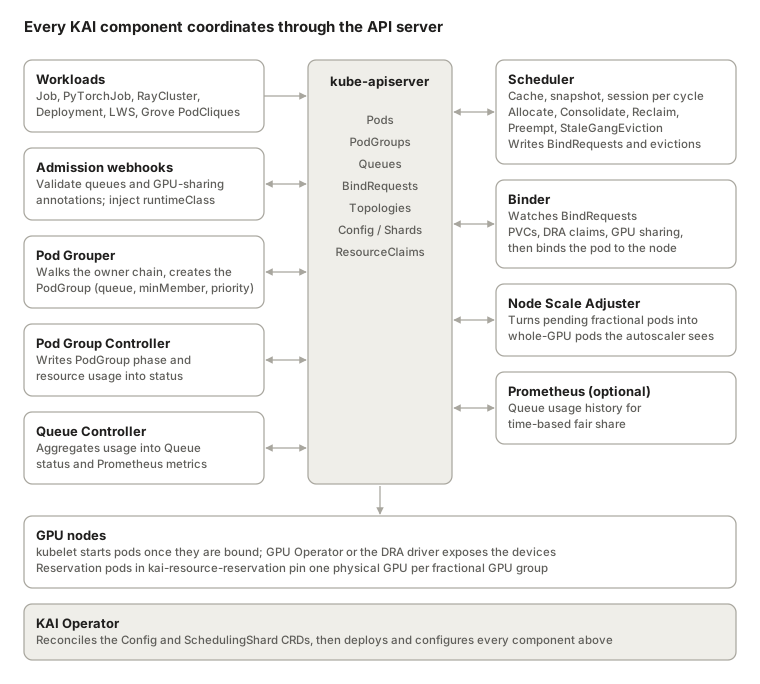
Left of the API server sit the components that prepare work; right of it sit the ones that decide and act. Everything is installed by one Helm chart into the kai-scheduler namespace and reconciled by the operator.
| Component | Binary (cmd/) |
Reads | Writes |
|---|---|---|---|
| Operator | operator |
Config, SchedulingShard |
Deployments, ConfigMaps, webhooks for every component |
| Admission | admission |
Pods, Queues, PodGroups | Pod mutations (runtimeClass, GPU-sharing env), admit/deny |
| Pod Grouper | podgrouper |
Pods and their owner chain | PodGroup objects, pod-group-name annotation on pods |
| Scheduler | scheduler |
Everything (via informers) | BindRequests, pod evictions, PodGroup conditions, events |
| Binder | binder |
BindRequests |
Pod bindings, PVC binding, ResourceClaim allocation, reservation pods |
| Pod Group Controller | podgroupcontroller |
Pods, PodGroups | PodGroup status (phase, resource usage) |
| Queue Controller | queuecontroller |
PodGroups, Queues | Queue status (allocated, requested), metrics |
| Resource Reservation | resourcereservation |
Its own pod + NVML | Annotation with the physical GPU index it holds |
| Node Scale Adjuster | nodescaleadjuster |
Unschedulable fractional pods | Scaling pods that request whole GPUs |
Two things are worth calling out. First, the operator is the single source of configuration: you change behaviour by editing the cluster-scoped Config (kai-config) or a SchedulingShard, not by patching Deployments. Second, the scheduler/binder split is what lets the scheduler run a tight loop over thousands of nodes. Binding a pod with a PVC or a DRA claim can take seconds and fail transiently; the binder retries with backoff while the scheduler has already moved on, treating the BindRequest as the expected outcome in its next snapshot.
The life of a pod: from kubectl apply to a running container
Follow one 3-pod PyTorchJob through the system. Nothing reaches a node until the scheduler has proven the whole gang fits, and nothing is bound until the binder has prepared every dependency.
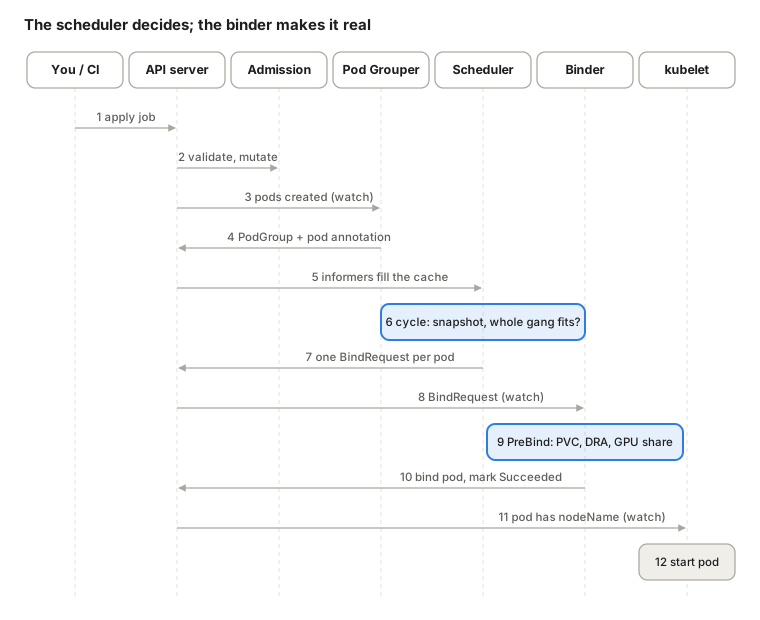
Submit. The workload carries two opt-ins:
schedulerName: kai-schedulerin the pod template and thekai.scheduler/queue: <leaf-queue>label. The training operator creates the master and worker pods.Admission. KAI's webhooks validate the pod (a fractional request can't be combined with
nvidia.com/gpu,gpu-fractionmust be between 0 and 1, and so on) and mutate it, for example injecting a runtime class for GPU-sharing pods.Grouping. The pod grouper sees each pod, walks
ownerReferencesup to the PyTorchJob, and picks the plugin for that kind.PodGroup. It creates one PodGroup with
minMemberequal to the replica count (3), the queue, and a default priority class (trainfor PyTorchJob). It annotates each pod withpod-group-name.Cache. The scheduler's informers pick up pods, nodes, queues, PodGroups and BindRequests.
Cycle. At the next
schedulePeriod, the scheduler snapshots state and runs its actions. Allocate only commits if all 3 pods can be placed in the same simulation.Decision. For each pod it writes a
BindRequest(pod, node, GPU allocation, DRA claims, retry policy). The pod itself is not touched yet.Pickup. The binder watches BindRequests.
PreBind. Binder plugins run in priority order:
volumebinding(300),dynamicresources(200),gpusharing(100), and optionallyhamicore(50).Bind. The binder creates the
Bindingsubresource and marks the BindRequest succeeded. On failure it retries up toBackoffLimit, then marks it failed so the scheduler can try again.Watch. The pod now has a
nodeName.Run. kubelet starts the containers; the pod group controller moves the PodGroup to Running.
One consequence matters for debugging: if pods are Pending with no events from kube-scheduler, check the PodGroup's conditions and events first, then any BindRequests in the pod's namespace (kubectl get bindrequests -n <ns>). KAI writes scheduling explanations as Kubernetes events at each major step.
The scheduling cycle: snapshot, session, actions, plugins
kube-scheduler is event-driven: a pod appears, it gets scored and bound. KAI is cycle-driven. Every schedulePeriod it freezes the cluster into a snapshot and makes all decisions against that frozen view, so a 64-pod gang is judged against one consistent picture rather than a moving target.
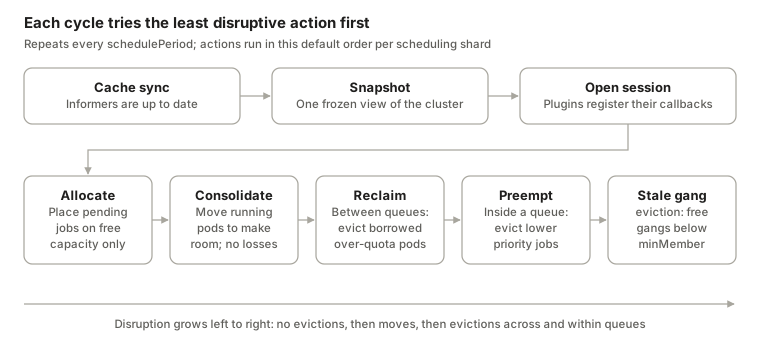
The pieces, in order:
Cache. Built from informers over pods, nodes, queues, PodGroups, BindRequests, topologies, ResourceClaims and more. It is also where committed decisions are applied back to the cluster.
Snapshot. A point-in-time copy. It guarantees consistency within a cycle, avoids repeated API calls, and can be dumped for offline debugging (the
snapshotplugin plus thesnapshot-toolbinary replay a cycle locally).Session. The context for one cycle. Plugins hook in at
OnSessionOpenand register functions; actions call those functions;OnSessionClosecleans up.Actions. Run in sequence. Each processes jobs one at a time and creates a statement per job.
The five actions
| Action | Scope | Evicts? | Commits when |
|---|---|---|---|
| Allocate | Pending jobs, ordered by queue then job | Never | The job's gang (or its minMember floor) fits on free capacity |
| Consolidate | Running pods that fragment GPUs | Temporarily, to relocate | Every moved pod has a new home and the pending job fits. Disabled when any placement strategy is spread |
| Reclaim | Across sibling queues | Preemptible, over-quota pods of other queues | The reclaimer is below its fair share or quota and the victim's queue stays at or above its own |
| Preempt | Inside one queue | Preemptible pods of strictly lower priority | The preemptor fits after evictions |
| StaleGangEviction | Running gangs | Whole gangs below minMember |
The stale grace period (default 60s) has expired |
The action list and order are configurable per shard through SchedulingShard.spec.actions. Each action has a priority (allocate 500, consolidation 400, reclaim 300, preempt 200, stalegangeviction 100) and can be disabled. queueDepthPerAction caps how many jobs per queue the expensive actions consider in one cycle.
Simulate first, commit later
Disruptive actions never evict on a hunch. They generate scenarios ("evict these victims, then place this job"), run cheap scenario filters to discard hopeless ones, then simulate the survivors inside a Statement: a transaction log over the snapshot.
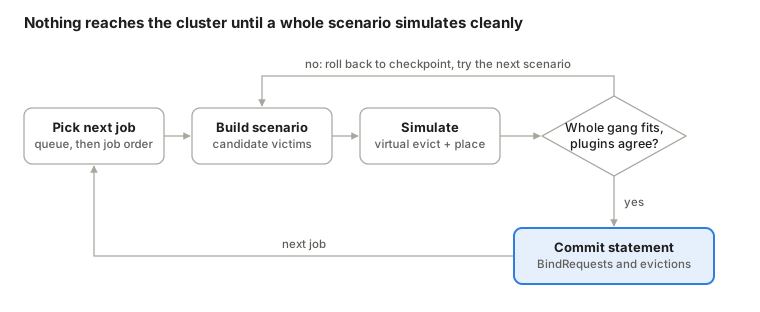
cp := stmt.Checkpoint()          // rollback point
stmt.Evict(victimPod, "reclaim") // virtual eviction
stmt.Pipeline(pod, node)          // place on resources that are being freed
stmt.Allocate(pod, node)          // place on free resources
if ok { stmt.Commit() } else { stmt.Rollback(cp) } // or stmt.Discard()
Pipeline is the clever part: a pod can be assigned to a node whose resources are still held by pods being evicted. That lets an action count capacity that is being freed in the same cycle, so the job that triggered the evictions has a claim on exactly that capacity instead of racing other jobs for it later.
Plugins: where policy lives
Actions are mechanics; plugins are policy. During OnSessionOpen each plugin registers functions on the session: AddJobOrderFn, AddTaskOrderFn, AddQueueOrderFn, AddNodeOrderFn (scoring), AddGpuOrderFn (which device on a node), AddPrePredicateFn / AddPredicateFn (filtering), AddReclaimableFn and friends (victim validation), plus AllocateFunc / DeallocateFunc event handlers that track virtual changes during simulation.
| Role | Default plugins (priority) |
|---|---|
| Filtering | predicates (1900), nodeavailability (1600), resourcetype (1500), podaffinity (1400), dynamicresources (700) |
| Fairness and ordering | proportion (1800), priority (1700), subgrouporder (1000), taskorder (900), nominatednode (800) |
| Workload integrations | elastic (1300), kubeflow (1200), ray (1100) |
| Protection | minruntime (600) |
| Placement | topology (500), gpupack or gpuspread (300), nodeplacement (200), gpusharingorder (100) |
| Debugging | snapshot (400) |
Higher priority runs first. You can disable, reorder, re-argument or add plugins in SchedulingShard.spec.plugins; supplying arguments replaces that plugin's defaults entirely, so copy the defaults you still want.
Queues and hierarchical fair share
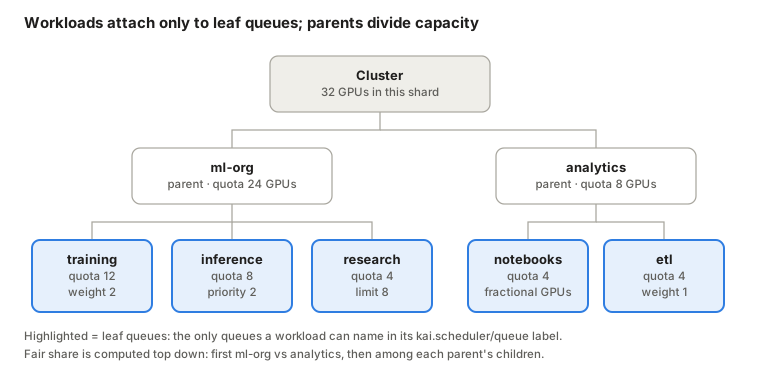
A queue is KAI's unit of ownership. Every workload must name a leaf queue, and each queue carries four knobs per resource (GPU, CPU, memory):
| Field | Meaning | Special values |
|---|---|---|
quota |
Deserved (guaranteed) amount. Always handed out first | -1 unlimited, 0 none |
overQuotaWeight |
Share of surplus relative to siblings at the same priority | Default 1 |
limit |
Hard cap, including borrowed capacity | -1 no limit, 0 nothing above quota |
priority |
Who gets surplus first among siblings | Higher wins |
Units are GPUs (1 = one device), CPU millicores and memory in MB. Queues nest through spec.parentQueue, so you can model departments, teams and projects.
apiVersion: scheduling.run.ai/v2
kind: Queue
metadata:
  name: ml-org
spec:
  resources:
    gpu: { quota: 24, overQuotaWeight: 3, limit: -1 }
    cpu: { quota: -1, limit: -1 }
    memory: { quota: -1, limit: -1 }
---
apiVersion: scheduling.run.ai/v2
kind: Queue
metadata:
  name: training
spec:
  parentQueue: ml-org
  priority: 1
  resources:
    gpu: { quota: 12, overQuotaWeight: 2, limit: -1 }
    cpu: { quota: -1, limit: -1 }
    memory: { quota: -1, limit: -1 }
A fresh install creates default-parent-queue and its leaf default-queue, both with zero quota and no limit, so you can submit immediately and design real queues later.
How fair share is computed
Every cycle, the proportion plugin divides capacity top down. At each level it runs two phases:
Deserved quota. Each queue gets
min(quota, requested). Priority is ignored here; every queue is treated equally.Over-quota. Whatever remains goes to the highest-priority bucket first. Inside a bucket it is split by
overQuotaWeight, capped by each queue's remaining request andlimit. Only then does the next priority bucket see anything.
# phase 1
for q in queues:
    q.fair_share = min(q.quota, q.requested)
remaining = total - sum(q.fair_share for q in queues)
# phase 2, per priority bucket (highest first)
while remaining > 0:
    w = sum(q.over_quota_weight for q in bucket)
    for q in bucket:
        give = min(remaining * q.over_quota_weight / w, q.remaining_request)
        q.fair_share += give; remaining -= give
The result then recurses into each parent's children.
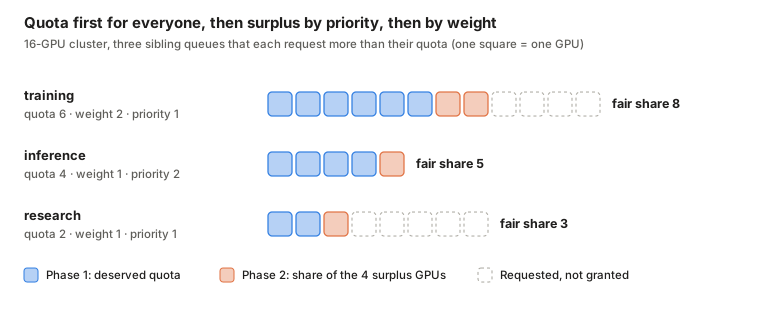
In this example, phase 1 hands out 6 + 4 + 2 = 12 GPUs. Of the 4 left, inference (priority 2) is served first and only needs 1 more. The remaining 3 go to the priority-1 bucket and split 2:1 by weight. The consequence people miss: a queue with priority 2 and weight 1 beats a queue with priority 1 and weight 100 for surplus. Weight only matters between equals.
Two more details make this work on real clusters. Fair share is computed per resource and combined with Dominant Resource Fairness (DRF), so a CPU-heavy queue and a GPU-heavy queue are compared on the resource each uses most. And every queue gets a saturation ratio, allocated / fairShare. Queues below 1 are scheduled first; queues above 1 are the candidates when someone else needs capacity back (next sections).
One rule ties fairness to workload priority: non-preemptible workloads (priority 100 or higher) can only use in-quota resources. Surplus is lent, so only workloads that can be evicted may borrow it.
Time-based fair share
Plain fair share is memoryless: a queue that hogged the cluster all night is treated the same as one that ran nothing. Since v0.10, KAI can feed historical usage back in. The pod group controller publishes per-PodGroup usage, the queue controller aggregates it into a metric, Prometheus stores it, and the scheduler queries it. Usage decays with a configurable half-life:
$$U = 0.5^{\Delta t / t_{1/2}} \cdot A$$
Usage is normalised to cluster capacity over the window (24 GPU-hours in a 10-GPU cluster over 10 hours scores 0.24), and the kValue argument controls how strongly it shrinks a queue's over-quota share. Deserved quota is never affected. Enable it with spec.prometheus.enabled: true on kai-config and point the scheduling shard at that Prometheus; the repo ships a simulator to tune parameters offline.
Gang scheduling, PodGroups and SubGroups
Gang scheduling means a workload starts with at least its minimum set of pods, or not at all. In KAI the gang is a PodGroup, and its floor is minMember.
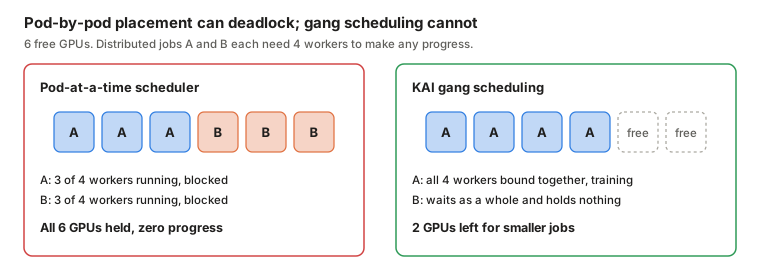
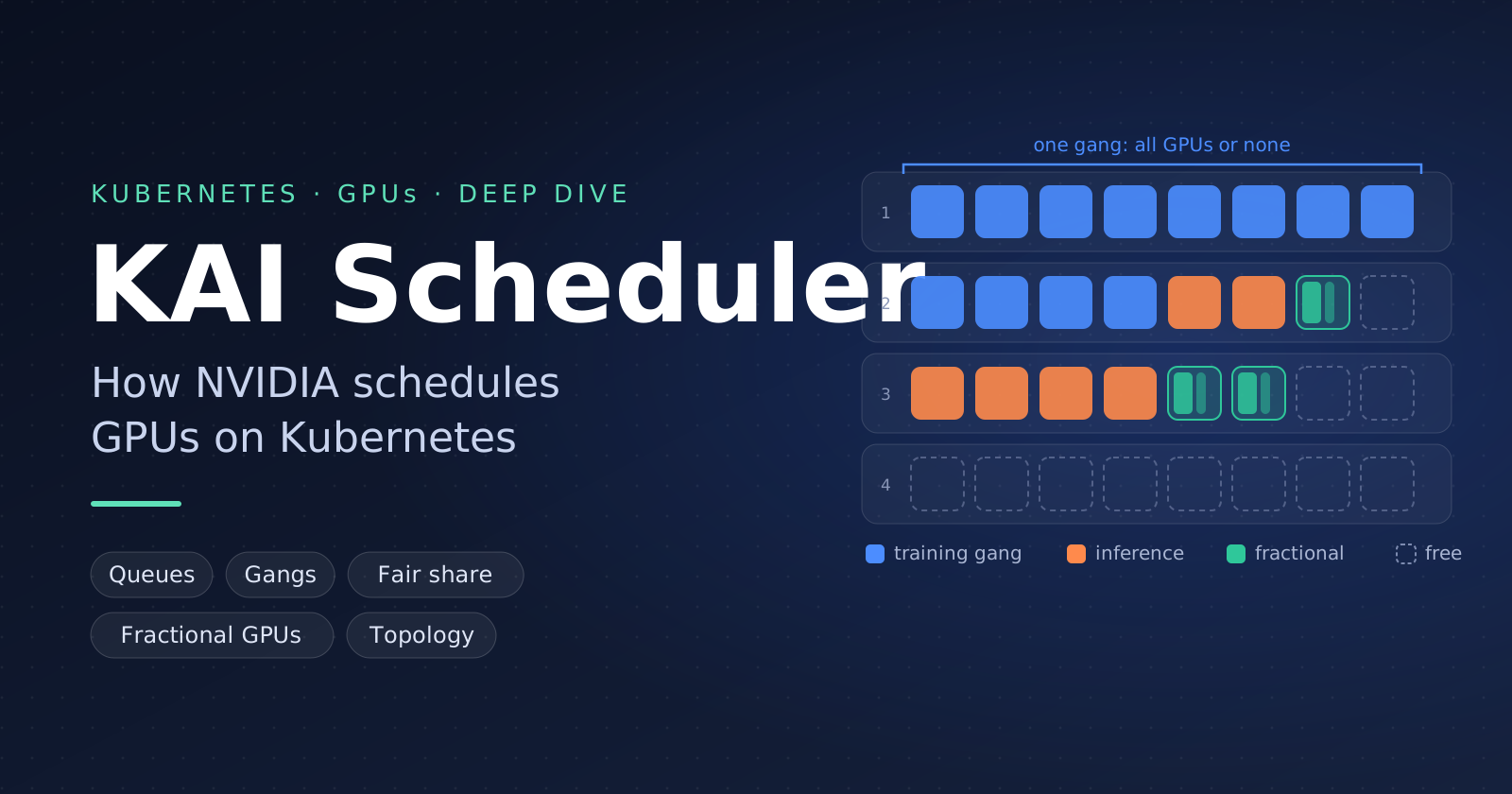
The failure on the left is not hypothetical. NCCL-based training blocks in initialisation until every rank joins, so partially placed jobs hold GPUs forever. With gangs, the scheduler only commits job A when all 4 workers fit in one simulation, and job B stays pending without holding anything.
PodGroups are created for you
You rarely write a PodGroup. The pod grouper walks each pod's owner chain to the top-level workload and uses a per-kind plugin to fill in the queue, minMember and a default priority class. Plugins exist for batch Jobs and CronJobs, Deployments, Kubeflow (PyTorchJob, MPIJob and friends), JobSet, LeaderWorkerSet, Ray, Knative, Spark, Grove and more.
| Workload | Default PodGroup shape | Default priority class |
|---|---|---|
batch/v1 Job |
minMember: 1 (no gang); override with kai.scheduler/batch-min-member |
train |
| Deployment | One PodGroup per Deployment, minMember: 1 (new default in v0.18) |
inference |
| PyTorchJob / MPIJob | All replicas, or minAvailable from the scheduling policy |
train |
| JobSet | One PodGroup; a parent SubGroup per replicatedJob and a leaf per replica | train |
| Kubeflow Notebook | Single pod | build |
The grouper can also "look through" orchestration layers. An Argo Workflow that launches a PyTorchJob is grouped by the PyTorchJob's rules, not by the Workflow. If you need several workloads in one gang, or your own controller owns the lifecycle, create the PodGroup yourself, set pod-group-name on the pod template, and add kai.scheduler/skip-podgrouper: "true".
apiVersion: scheduling.run.ai/v2alpha2
kind: PodGroup
metadata:
  name: hpo-sweep
  namespace: ml
spec:
  queue: training
  minMember: 2              # start once any 2 trials fit
  priorityClassName: train
Hierarchical PodGroups (SubGroups)
A flat gang is too blunt for disaggregated inference or multi-role training. Since v0.10, a PodGroup can contain a tree of SubGroups. Leaves carry minMember; the root and mid-level nodes carry minSubGroup (how many direct children must be satisfied). Each node can carry its own topology constraint.
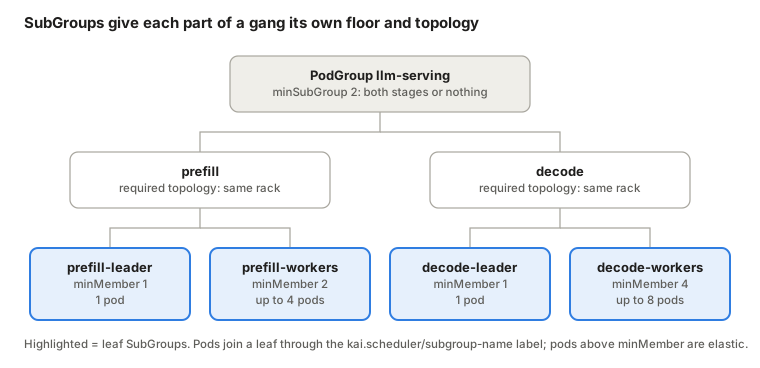
The scheduler orders SubGroups so the ones below their floor are filled first, then spreads extra pods to the SubGroup with the lowest allocated / minMember ratio. This is the layer that NVIDIA's Grove uses to express a Dynamo deployment as one schedulable unit.
When a gang breaks
If a running gang loses pods (a node dies, a pod OOMs) and drops below minMember, it is stale. Holding its remaining GPUs would recreate the deadlock above, so the StaleGangEviction action evicts the rest. Because transient failures are common, KAI first waits a stale grace period: 60s by default, configurable globally (globalDefaultStalenessGracePeriod) or per workload with the kai.scheduler/staleness-grace-period annotation. A negative value disables stale eviction for that workload.
GPU sharing: fractions of a GPU on a device plugin that only counts whole ones
The NVIDIA device plugin advertises nvidia.com/gpu as an integer. KAI lets a pod ask for part of one anyway, through an annotation, and keeps the bookkeeping itself.
apiVersion: v1
kind: Pod
metadata:
  name: notebook-a
  labels:
    kai.scheduler/queue: notebooks
  annotations:
    gpu-fraction: "0.5"        # or gpu-memory: "20000" (MiB)
spec:
  schedulerName: kai-scheduler
  containers:
    - name: jupyter
      image: nvcr.io/nvidia/pytorch:25.09-py3
      # no nvidia.com/gpu here: mixing the two is rejected by admission
The trick is a placeholder. To kubelet, a GPU used for sharing is owned by one reservation pod that requests nvidia.com/gpu: 1. To KAI, that GPU is a GPU group with capacity 1.0 that it packs fractional pods into.
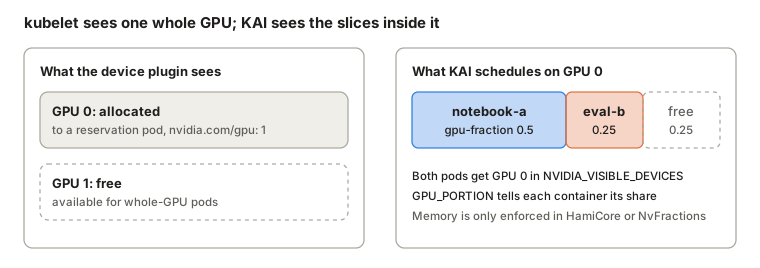
Binding a fractional pod is where the separate binder earns its keep:
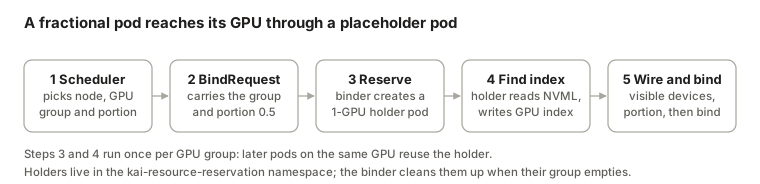
The reservation pod is a tiny program that asks NVML which physical GPU it was given and annotates itself with the index (run.ai/reserve_for_gpu_index). The binder's gpusharing plugin then labels the user pod with the GPU group, sets NVIDIA_VISIBLE_DEVICES (or a CDI device name when CDI is on) and GPU_PORTION through a per-pod ConfigMap, and binds it.
Isolation is a separate decision
Placing pods on a shared GPU and stopping them from using each other's memory are different problems. Admins pick one cluster-wide mode with global.gpuSharingMode:
| Mode | Scheduling | Memory enforced? | Request annotations |
|---|---|---|---|
NonMemoryEnforced (default) |
Fractions and MiB | No. A container can see and use the whole GPU | gpu-fraction, gpu-memory |
HamiCore |
Fractions and MiB | Yes, via HAMi-core injected CUDA_DEVICE_MEMORY_LIMIT |
gpu-fraction, gpu-memory |
NvFractions (new in v0.18) |
Per-container memory quantities | Yes, via gpu-fractioning (needs GPU Operator 26.7.1+, r615 driver, containerd 2.0 with NRI) | nvidia.com/container.<name>.gpu-memory.request / .limit |
Disabled |
Rejected | n/a | n/a |
In the default mode, a fraction is a scheduling promise, not a fence. That is fine for trusted notebooks and evals and risky for multi-tenant inference: one process that allocates the whole GPU will OOM its neighbours. If tenants don't trust each other, use HamiCore or NvFractions, or MIG.
A few practical rules. Only one container per pod can request a fraction. gpu-fraction-num-devices: "2" asks for the same fraction on two devices. KAI does not support the device plugin's time-slicing replicas setting; use these modes instead. And because fractional pods request no nvidia.com/gpu, a cluster autoscaler cannot see their demand. Enable global.clusterAutoscaling=true and the node scale adjuster sums pending fractions (two 0.5 pods become one) and launches whole-GPU scaling pods that the autoscaler does see.
Placement: bin-pack, spread and topology
Once a job is allowed to run, KAI still has to choose where. Three layers of plugins answer that: nodeplacement picks nodes, gpupack / gpuspread pick devices inside a node, and topology constrains both to a rack, block or zone.
Bin-pack vs spread
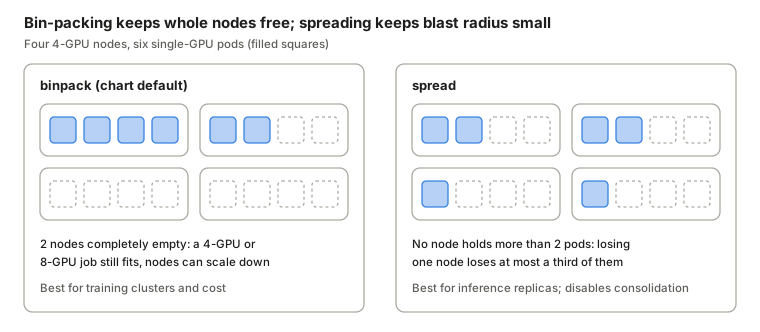
The strategy is set per shard and per resource:
apiVersion: kai.scheduler/v1
kind: SchedulingShard
metadata:
  name: default
spec:
  placementStrategy:
    gpu: binpack   # node level: fill the busiest node that fits
    cpu: spread
Node-level and device-level placement are independent. You can spread pods across nodes for resilience but still pack them onto the same GPUs inside each node by setting gpu: spread and enabling gpupack instead of gpuspread. With fractional GPUs, gpusharingorder prefers GPUs that are already shared, which keeps whole GPUs free for whole-GPU jobs.
One coupling to remember: the consolidation action only runs when every placement strategy is binpack. Spreading and defragmenting pull in opposite directions.
Topology-aware scheduling (TAS)
A 32-GPU training job spread over four racks spends its life waiting on the spine network. TAS fixes that. You describe the physical hierarchy once, from coarsest to finest, using node labels you already have (cloud providers and NVIDIA's topology tooling publish them):
apiVersion: kai.scheduler/v1alpha1
kind: Topology
metadata:
  name: cluster-topology
spec:
  levels:
    - nodeLabel: cloud.provider.com/topology-block
    - nodeLabel: cloud.provider.com/topology-rack
    - nodeLabel: kubernetes.io/hostname
Workloads then opt in with annotations. Required placement is a hard boundary; preferred placement is a target that may fall back to a larger domain. Combining them gives "must stay in one block, try hard to stay in one rack":
metadata:
  annotations:
    kai.scheduler/topology: cluster-topology
    kai.scheduler/topology-required-placement: cloud.provider.com/topology-block
    kai.scheduler/topology-preferred-placement: cloud.provider.com/topology-rack
The algorithm deliberately pulls in two directions:
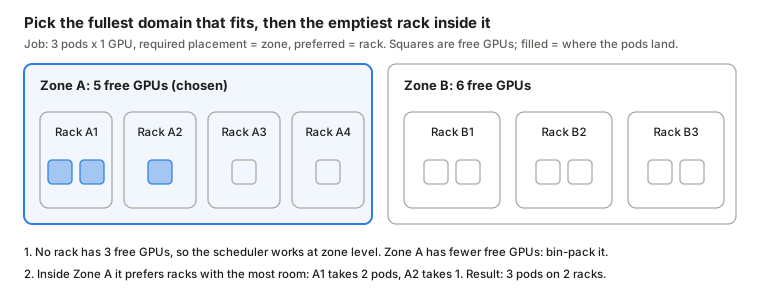
Domain selection bin-packs (choose the domain with the least free capacity that still fits) to keep large empty domains for the next big job. Node ordering inside the domain does the opposite at the preferred level (choose the sub-domain with the most free capacity) to keep this job's pods together. In hierarchical PodGroups, each SubGroup can carry its own constraint, so prefill can be pinned to one rack and decode to another while the PodGroup is still admitted as one gang. On GB200/GB300 systems the same mechanism is how you keep a job inside one NVLink domain.
For finer locality inside a node, KAI also has a numa plugin and a NUMA placement exporter that align GPUs, CPUs and memory to the same socket.
Priority, preemption, reclaim and consolidation
KAI has two priorities that are easy to confuse. Queue priority decides which queue gets surplus first (previous section). Workload priority, a normal Kubernetes PriorityClass, decides order and eviction inside a queue. The chart installs four:
| PriorityClass | Value | Preemptible | Typical use | Default for |
|---|---|---|---|---|
train |
50 | Yes | Training, batch, HPO | Jobs, PyTorchJob, MPIJob, everything else |
build-preemptible |
75 | Yes | Interactive work you're willing to lose | |
build |
100 | No | Notebooks, dev pods | Kubeflow Notebook |
inference |
125 | No | Serving | Deployment, Knative Service |
The threshold is 100: anything at or above it is non-preemptible by default and, in exchange, can only run inside its queue's quota. Since recent releases you can decouple the two with an explicit preemptibility on the PodGroup (preemptible, non-preemptible, or the alpha semi-preemptible), so "high priority but evictable" is expressible.
Two eviction paths, never mixed
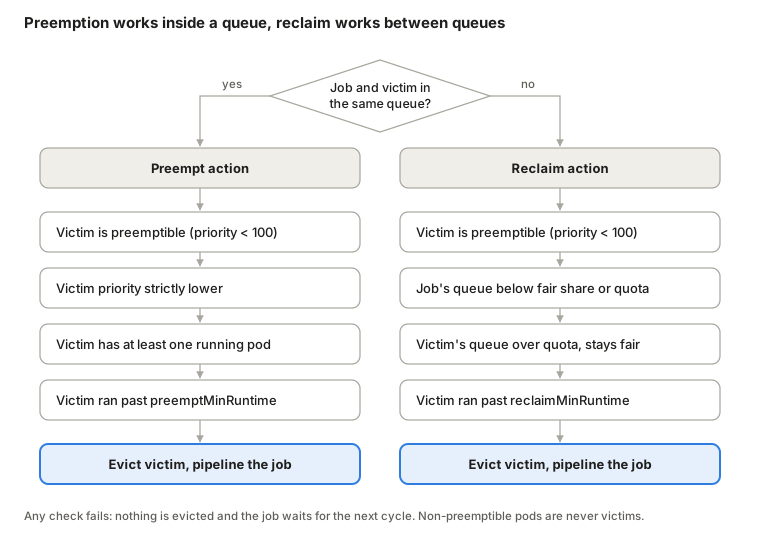
The split is strict. A workload can never preempt across queues, and reclaim never targets a workload in the same queue. That is what gives teams a real guarantee: as long as a queue runs only inside its deserved quota, nothing outside it can evict its pods. Reclaim only ever takes back what was lent.
Reclaim also preserves order. After a reclaim, the queue that had the lowest saturation ratio among its siblings still has the lowest, and a queue that was under quota is still under quota. That stops two queues from evicting each other forever. Two knobs tune it on the proportion plugin:
reclaimerUtilizationMultiplier(default1.0, must be at least 1). Values above 1 make reclaim more conservative.queuePriorityInQuotaReclaim(alpha, defaultfalse). Lets a strictly higher-priority queue reclaim in-quota preemptible pods from a lower-priority one, as long as it stays within its own quota. It weakens the guarantee above, so enable it per shard deliberately.
Don't evict too early
Killing a job 30 seconds after it started wastes the start-up cost and can cause thrashing. The minruntime plugin lets queues set a floor, inherited down the hierarchy:
apiVersion: scheduling.run.ai/v2
kind: Queue
metadata:
  name: training
spec:
  parentQueue: ml-org
  preemptMinRuntime: "10m"   # same-queue preemption waits 10 minutes
  reclaimMinRuntime: "30m"   # cross-queue reclaim waits 30 minutes
  resources:
    gpu: { quota: 12, overQuotaWeight: 2, limit: -1 }
Shard-level defaults live in SchedulingShard.spec.minRuntime. For reclaim you can resolve the value from the victim's queue or from the lowest common ancestor of the two queues.
Consolidation: defragmenting without losing work
Reclaim and preempt make room by removing work. Consolidation makes room by moving it.
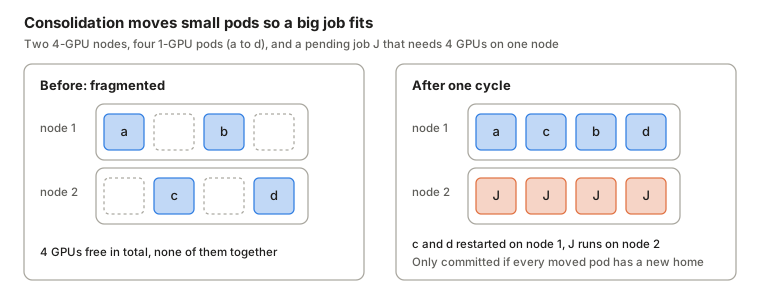
It only commits if every displaced pod can be re-placed in the same simulation, so nothing is lost except a restart. That still matters: a pod that is moved is evicted and restarted, so workloads without checkpointing pay for it. Disable the action per shard (spec.actions.consolidation.enabled: false) if your jobs can't tolerate restarts.
Elastic workloads, DRA and scheduling shards
Elastic and semi-preemptible workloads
An elastic workload declares a floor and runs with whatever extra capacity is available. In KAI the floor is minMember (or minSubGroup for hierarchical gangs) and the ceiling is the number of pods the workload creates. Pods above the floor are scheduled opportunistically and, under pressure, evicted individually, leaders last, while the job keeps running. A PyTorchJob with elasticPolicy minReplicas: 1, maxReplicas: 3 starts on one worker and grows to three when the cluster is idle.
The gap this leaves: an elastic inference service is usually high priority, which makes it non-preemptible and confined to quota, so it can't burst at all. v0.18 adds an alpha answer, semi-preemptible:
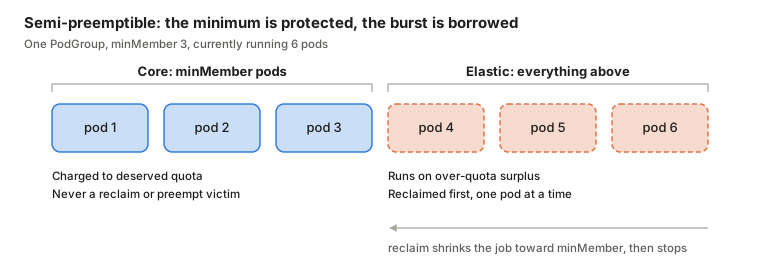
apiVersion: scheduling.run.ai/v2alpha2
kind: PodGroup
metadata:
  name: llm-serving
spec:
  queue: inference
  preemptibility: semi-preemptible
  minMember: 3          # 3 protected pods; pods 4+ are elastic
With minMember: 0 it behaves like a fully preemptible job; with minMember equal to the pod count, like a non-preemptible one. Raising minMember on a running semi-preemptible PodGroup is rejected by admission, because it would silently re-charge elastic pods to quota. It is alpha, so keep it off production paths for now.
Dynamic Resource Allocation
DRA replaces integer device counts with ResourceClaims that a driver satisfies. KAI's snapshot includes claims, the dynamicresources plugin filters nodes on them, and the binder's dynamicresources plugin writes the allocation before binding. The headline use case is GB200/GB300: NVIDIA's k8s-dra-driver-gpu exposes Multi-Node NVLink through a ComputeDomain, and pods request IMEX channels as claims. The scheduler records the claim allocation in the BindRequest:
spec:
  podName: gpu-imex-pod
  receivedResourceType: Regular
  receivedGPU: { count: 1, portion: "1.00" }
  resourceClaimAllocations:
  - allocation:
      devices:
        config:
        - opaque:
            driver: compute-domain.nvidia.com
DRA support is behind a feature gate at install time: pass --feature-gates=DynamicResourceAllocation=true to both scheduler and binder through scheduler.additionalArgs and binder.additionalArgs.
Scheduling shards
One scheduler instance does not have to own the whole cluster. A SchedulingShard creates a separate scheduler for nodes, queues and PodGroups that share a kai.scheduler/node-pool label value.
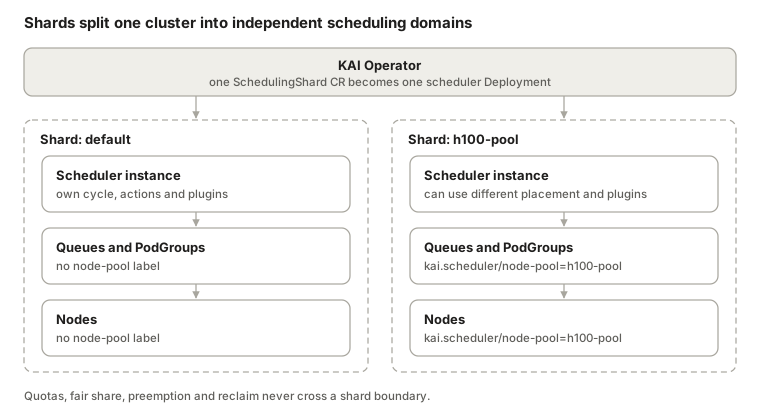
Shards are how you give an H100 pool bin-packing and aggressive reclaim while a mixed CPU/GPU pool spreads, or isolate a noisy research pool from production. The trade-off: capacity in one shard can never be borrowed by another.
Everything else worth knowing
Background pods (v0.18): maintenance pods are ignored when scheduling and evicted when they're in the way.
In-place pod resize (v0.18): KEP-1287 resizes are accounted against queue quota and limits, with a queue admission webhook.
NUMA-aware placement: a
numaplugin plus a NUMA placement exporter keep GPU, CPU and memory on one socket.Explainability: every major scheduling step is an event, and
detailed-fit-errors(off by default, costly on big clusters) explains exactly why a pending pod didn't fit a node.Snapshot tool: dump a cycle's snapshot and replay it locally to debug a decision.
Operations: HA replicas with PDBs for binder and queue controller, JSON logging, a
fipsMode, and public scale-test and benchmark dashboards.
Hands-on: install KAI and run real workloads
You need a Kubernetes cluster, Helm, and the NVIDIA GPU Operator on the GPU nodes. Everything below works on a single GPU node; the gang example wants three GPUs.
1. Install
helm upgrade -i kai-scheduler \
  oci://ghcr.io/kai-scheduler/kai-scheduler/kai-scheduler \
  -n kai-scheduler --create-namespace \
  --version v0.18.6

kubectl -n kai-scheduler get pods
kubectl get config kai-config -o jsonpath='{.status.conditions}' | jq
kubectl get queues      # default-parent-queue, default-queue
Useful flags at install time: --set global.gpuSharingMode=HamiCore for memory-isolated sharing, --set global.clusterAutoscaling=true with an autoscaler, and on OpenShift with GPU Operator older than 25.10 add --set admission.gpuFractionRuntimeClassName=null. Never submit workloads into the kai-scheduler namespace.
2. Create team queues
apiVersion: scheduling.run.ai/v2
kind: Queue
metadata:
  name: ml-org
spec:
  resources:
    gpu: { quota: -1, overQuotaWeight: 1, limit: -1 }
    cpu: { quota: -1, overQuotaWeight: 1, limit: -1 }
    memory: { quota: -1, overQuotaWeight: 1, limit: -1 }
---
apiVersion: scheduling.run.ai/v2
kind: Queue
metadata:
  name: training
spec:
  parentQueue: ml-org
  resources:
    gpu: { quota: 2, overQuotaWeight: 2, limit: -1 }
    cpu: { quota: -1, overQuotaWeight: 1, limit: -1 }
    memory: { quota: -1, overQuotaWeight: 1, limit: -1 }
---
apiVersion: scheduling.run.ai/v2
kind: Queue
metadata:
  name: notebooks
spec:
  parentQueue: ml-org
  resources:
    gpu: { quota: 1, overQuotaWeight: 1, limit: 2 }
    cpu: { quota: -1, overQuotaWeight: 1, limit: -1 }
    memory: { quota: -1, overQuotaWeight: 1, limit: -1 }
3. A whole-GPU pod and a fractional pod
apiVersion: v1
kind: Pod
metadata:
  name: gpu-pod
  namespace: ml
  labels: { kai.scheduler/queue: training }
spec:
  schedulerName: kai-scheduler
  containers:
    - name: cuda
      image: nvidia/cuda:13.0.2-base-ubi8
      command: ["sh", "-c", "nvidia-smi -L && sleep 3600"]
      resources: { limits: { nvidia.com/gpu: 1 } }
---
apiVersion: v1
kind: Pod
metadata:
  name: half-gpu
  namespace: ml
  labels: { kai.scheduler/queue: notebooks }
  annotations: { gpu-fraction: "0.5" }
spec:
  schedulerName: kai-scheduler
  containers:
    - name: cuda
      image: nvidia/cuda:13.0.2-base-ubi8
      command: ["sh", "-c", "nvidia-smi && sleep 3600"]
After applying, look at what KAI created around them:
kubectl -n ml get podgroups                      # one per pod
kubectl -n ml get bindrequests                   # the scheduler's decisions
kubectl -n kai-resource-reservation get pods     # the GPU holder for half-gpu
kubectl -n ml exec half-gpu -- env | grep -E 'NVIDIA_VISIBLE_DEVICES|GPU_PORTION'
4. A gang: distributed PyTorch
With the Kubeflow training operator installed, the only KAI-specific lines are the queue label and schedulerName. The pod grouper sets minMember: 3.
apiVersion: kubeflow.org/v1
kind: PyTorchJob
metadata:
  name: ddp-mnist
  namespace: ml
  labels: { kai.scheduler/queue: training }
spec:
  pytorchReplicaSpecs:
    Master:
      replicas: 1
      restartPolicy: OnFailure
      template:
        spec:
          schedulerName: kai-scheduler
          containers:
            - name: pytorch
              image: ghcr.io/kubeflow/training-v1/pytorch-dist-mnist:latest
              args: ["--backend", "nccl", "--epochs", "5"]
              resources: { limits: { nvidia.com/gpu: 1 } }
    Worker:
      replicas: 2
      restartPolicy: OnFailure
      template:
        spec:
          schedulerName: kai-scheduler
          containers:
            - name: pytorch
              image: ghcr.io/kubeflow/training-v1/pytorch-dist-mnist:latest
              args: ["--backend", "nccl", "--epochs", "5"]
              resources: { limits: { nvidia.com/gpu: 1 } }
On a node with fewer than three free GPUs, all three pods stay Pending and hold nothing. Delete gpu-pod and watch all three start together.
5. When something stays Pending
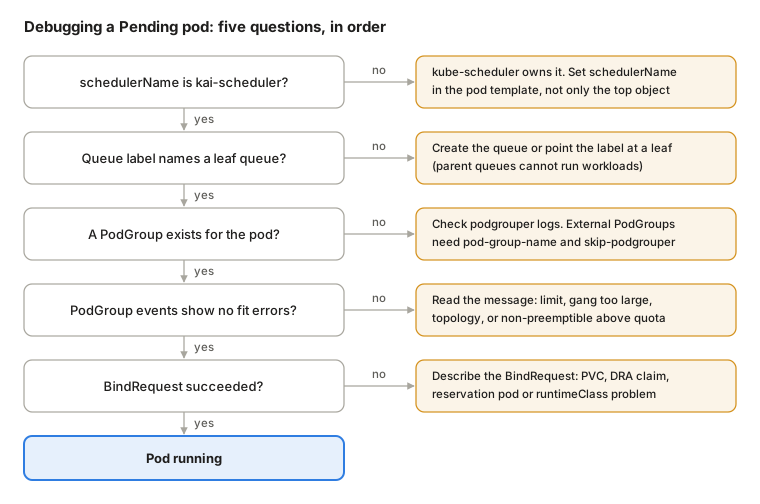
The commands behind each check: kubectl get pod <p> -o jsonpath='{.spec.schedulerName}', kubectl get queue <q> -o yaml, kubectl -n <ns> get podgroups, kubectl -n <ns> describe podgroup <pg>, and kubectl -n <ns> describe bindrequest <br>. For deeper digging, turn on detailed-fit-errors temporarily or use the snapshot tool to replay the cycle offline. The repo also ships an agent skill that walks this same diagnosis.
KAI vs Volcano vs Kueue vs plain kube-scheduler
All four can run GPU jobs. The real difference is which layers each one owns.
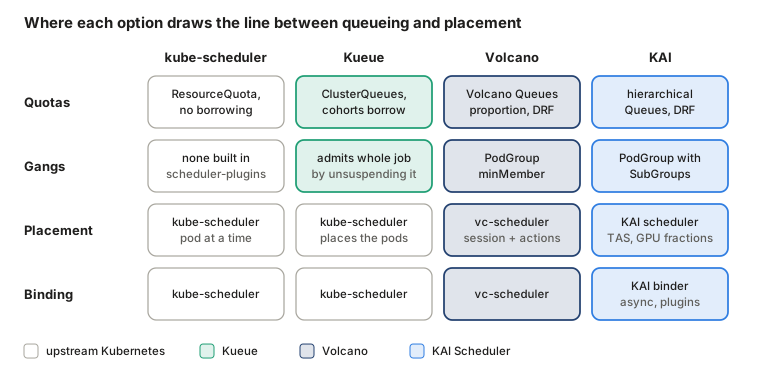
Kueue (a Kubernetes SIG project) is a job-level admission controller. It holds jobs suspended until their ClusterQueue has quota, then lets kube-scheduler place the pods. That keeps the upstream scheduler and every plugin you rely on, but placement and admission are separate decisions, so "admitted" is not the same as "all pods fit on nodes right now" unless you also use Kueue's topology-aware admission. Volcano (CNCF) and KAI both descend from kube-batch and replace the scheduler for the pods they own: queueing, gang checks and placement happen in one session over one snapshot. KAI additionally splits binding into its own controller.
| kube-scheduler | Kueue | Volcano | KAI Scheduler | |
|---|---|---|---|---|
| Model | Pod at a time | Job admission, then kube-scheduler | Batch scheduler, session + actions | Batch scheduler, session + actions, separate binder |
| Quota borrowing and take-back | No | Cohorts, borrowing, preemption | Queue capacity, reclaim | Quota, over-quota weight, priority, reclaim |
| Hierarchical queues | No | Hierarchical cohorts | Supported | Native, any depth |
| Gang scheduling | Via scheduler-plugins | At admission | PodGroup | PodGroup with SubGroups |
| Fractional GPUs | No (time-slicing or MIG at driver level) | No (relies on devices) | Via HAMi vGPU integration | Native: fraction, MiB, optional enforcement |
| Topology-aware | Pod topology spread | Topology-aware admission | Network-topology aware | Required/preferred, per SubGroup |
| Time-based fairness | No | Fair sharing with usage decay | Not the main model | Prometheus-backed, half-life |
| Best fit | Few, uncontended GPU services | Keep kube-scheduler, add multi-tenant admission | General batch and HPC, Spark, MPI | Shared GPU pools for training + inference, NVIDIA stack (Grove, Dynamo, KubeRay) |
Feature details move every release in all three projects, so check current docs before deciding on a single row.
How I'd choose
KAI first if GPUs are the scarce resource and several teams share them. Hierarchical quotas with automatic reclaim, fractional GPUs, topology-aware gangs and a binder that handles DRA are all in one place, and it's the scheduler NVIDIA's own serving stack (Grove/Dynamo) is designed around.
Kueue first if you want to keep kube-scheduler untouched, mostly run whole-GPU batch jobs, or need multi-cluster dispatch. It's the least invasive way to add quotas and borrowing.
Volcano first if your workloads are broad batch and HPC (Spark, MPI, Flink) with GPUs as one resource among many, and you value its long production history and job CRD.
None of them if you have a few inference Deployments on dedicated nodes and no contention. A second scheduler is something you have to upgrade, monitor and debug.
Production considerations for KAI
Two schedulers, two views. Pods without
schedulerName: kai-schedulerare invisible to KAI's queues. Mixing schedulers on the same GPU nodes means KAI's fair share can be wrong. Dedicate GPU nodes to KAI or enforceschedulerNamewith policy (Kyverno, Gatekeeper).Quotas are a promise you must back. Sum of leaf quotas should not exceed real capacity, or "guaranteed" isn't. v0.18 validates sibling sums against parents.
Pick a sharing mode deliberately.
NonMemoryEnforcedis a scheduling convention, not isolation.Plan for evictions. Anything that borrows surplus (priority below 100) can be reclaimed. Train with checkpoints, set
reclaimMinRuntimeto protect start-up, and usebuild/inferenceclasses for work that must not die.Size the scheduler. Memory scales with cluster objects; the repo has resource-sizing guidance. Run replicas with PDBs.
Watch upgrades. Pre-1.0 releases ship behaviour changes (v0.18 changed Deployment grouping to one PodGroup per Deployment). Read the migration guide for every minor bump.
Where I landed
KAI's design comes down to three ideas: schedule workloads through PodGroups, decide over a frozen snapshot with simulate-then-commit actions, and hand the slow part to a separate binder. Almost every feature above (gangs, fair share and reclaim, fractional GPUs, topology, DRA) is a plugin or action on top of those three.
For a shared GPU platform I'd adopt it in this order:
Install with defaults, dedicate GPU nodes to it, and move one team onto a leaf queue with a real quota.
Add the other teams' queues and let over-quota borrowing run with
train-class jobs. SetreclaimMinRuntimebefore anyone complains about being reclaimed.Turn on GPU sharing for notebooks and evals, with
HamiCoreorNvFractionsif tenants don't trust each other.Describe the network with a
TopologyCRD and add required/preferred placement to multi-node training and disaggregated serving.Only then reach for the alpha features: semi-preemptible inference,
queuePriorityInQuotaReclaim, time-based fair share.
The test I'd hold it to is the same as for any control plane: can you explain, from kubectl output alone, why a pod is pending, why another was evicted, and who owns the GPUs right now? With PodGroups, BindRequests, queue status and events, KAI makes that answerable. That, more than any single feature, is why I'd run it.
Sources
KAI Scheduler repository (main branch, checked 21 October 2026)
KAI Scheduler on GitHub and CHANGELOG (v0.18.0, 23 September 2026)
Binder and Pod Grouper
Batch / gang scheduling, Hierarchical PodGroup design, Elastic and semi-preemptible
Topology-aware scheduling, DRA, Min runtime plugin, Stale grace period
Ecosystem
About the author
- AI infrastructure engineer. Inference, GPUs and GitOps on Kubernetes.
Comments
Join the discussionNo comments yet. Be the first to comment.